
How to Create Stunning, Factually Accurate Infographics with Google’s Nano Banana Pro

Let’s be honest: unless you have a degree in graphic design or an expensive subscription to Adobe Creative Cloud, your “data visualization” usually ends up looking like a sad Excel chart pasted into a PowerPoint slide. We want to tell stories with data, but the barrier to entry has always been skill and patience.
Enter Nano Banana Pro.
This isn’t just another “make me a picture of a cat astronaut” AI toy. Built on the architecture of Gemini 3 Pro, this model has specific superpowers that target the biggest headaches of design work: factual grounding and legible text.
If you want to create infographics with Nano Banana Pro, you don’t need to be a designer. You just need to know how to talk to the machine. Here is your practical Nano Banana Pro infographic tutorial to go from a vague idea to a professional, shareable asset in minutes.
The Death of the “Hallucinated” Chart
For a long time, the best AI tools for data visualization had a fatal flaw: they were compulsive liars. You’d ask for a chart about coffee prices, and the AI would invent numbers, dream up countries that don’t exist, and spell “Coffee” as “Cofvefe.”
Nano Banana Pro changes the game with two distinct features:
- Search Grounding: Unlike older models, you can ask Nano Banana Pro to use Google Search to verify the data it visualizes. It pulls real stats, meaning your chart isn’t just pretty—it’s accurate. And Gemini even provides the source links to verify the information it uses, which is super cool!
- Advanced Text Rendering: AI text rendering for infographics used to be a mess of alien gibberish. This model understands typography. It can render titles, labels, and legends that are actually legible 95% of the time.
How To Create infographics with Nano Banana Pro
Phase 1: The “Prompt Formula”
Don’t just type “make a chart.” That’s how you get generic clip art. To get results that look like they belong in a magazine, you need to act like an Art Director.
Use this formula for your prompts: Subject + Data Source + Visual Style + Key Elements.
Example A: The Educational Explainer
Let’s say we want to explain a process. We need accuracy, and we need clear steps.
The Prompt:
“Create an accurate, visually appealing infographic detailing the lifecycle of a coffee bean, from farm to cup. Use Google Search to ensure the steps are factually correct. The style should be a clean, modern flat design with a warm, earthy color palette. Include clear labels for each stage like ‘Harvesting,’ ‘Processing,’ ‘Roasting,’ and ‘Brewing’ with small illustrative icons for each.”
The Result:
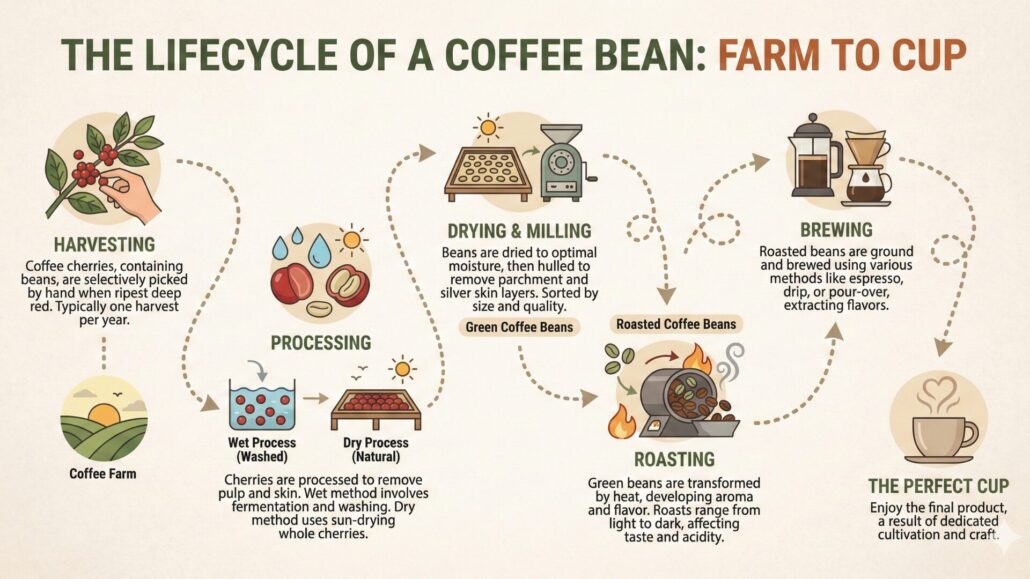
Notice the difference? We didn’t just ask for coffee; we asked for specific stages and a specific color palette. The result is a cohesive narrative, not just a random collage.
Example B: The Data Comparison
Now let’s try something harder: specific numbers. This is where the Gemini 3 Pro image generator backend really flexes its muscles.
The Prompt:
“Generate a futuristic, neon-styled bar chart comparing global electric vehicle sales in 2023 versus estimated sales for 2025. Make sure the data points are clearly labeled with accurate numbers. The background should be a dark, glowing circuit board pattern.”
The Result
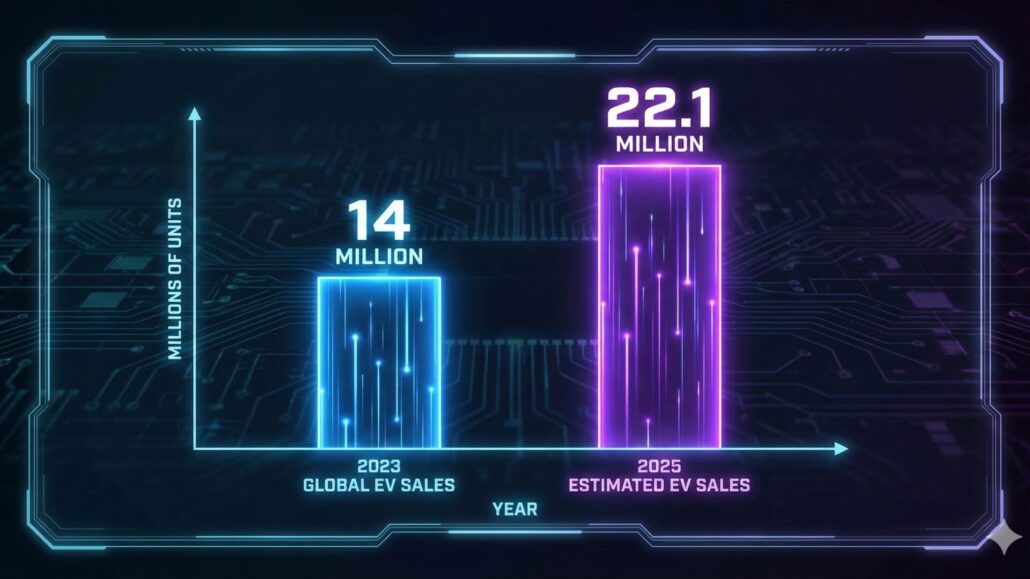
Phase 2: The Art of the Tweak
Here is one of the most important Nano Banana Pro design tips I can give you: Don’t settle for the first draft.
Treat Nano Banana Pro like a junior designer. The first draft is rarely perfect. Maybe the text color is hard to read against the background, or maybe it listed “2024” twice.
You don’t need to rewrite the whole prompt. Just converse with it.
- “The second step in the process is incorrect. It should be ‘Fermentation,’ not ‘Drying.’ Please fix that step and keep everything else the same.”
- “This looks great, but the title text is hard to read. Please make the main title bolder and change its color to white for better contrast.”
This iterative process is where the magic happens. It turns a “cool AI image” into a usable business asset.
Pro-Tip: Cloning Your Brand Style
If you run a website or a business, you don’t want your graphics to look like generic stock art. You want them to look like you.
Nano Banana Pro supports reference images. You can upload your logo, a screenshot of your website, or a previous design you loved.
Try this: Upload your brand logo and add this to your prompt:
“Using the color palette and clean icon style from the uploaded image, create a new infographic about our quarterly growth…”
This “style transfer” creates consistency across your content, making it look like you hired an in-house team rather than just clicking a button.
Wrapping Up With Your New Creative Partner
Nano Banana Pro doesn’t replace the need for human creativity. You still need to know what story you want to tell. But it removes the technical barrier that kept that story locked in your head.
The tool handles the heavy lifting of layout, illustration, and typography, freeing you up to focus on the narrative. It’s time to stop making boring charts and start telling visual stories.
And for bonus points, try using a Gemini and NotebookLM workflow to really nail down your info.
Cheers!
(Note: All images generated by Nano Banana Pro include an invisible SynthID watermark, ensuring transparency about their AI origins.)






Leave a Reply
Want to join the discussion?Feel free to contribute!