
Google Photos Video Editor Update Adds Universal Timeline
For the last decade, the “Photos” app on any smartphone has primarily served one function: a digital shoebox. It was a place where memories went to gather dust, occasionally surfaced by an algorithm. But with today’s rollout of a redesigned video editor for iOS and Android, Google has officially declared that the era of the passive gallery is over. By embedding a multi-track, layer-based editor directly into its cloud locker, Google isn’t just competing with third-party apps like CapCut; it is challenging Apple’s philosophy of keeping “management” and “creation” separate.
The Universal Timeline and Adaptive Canvas

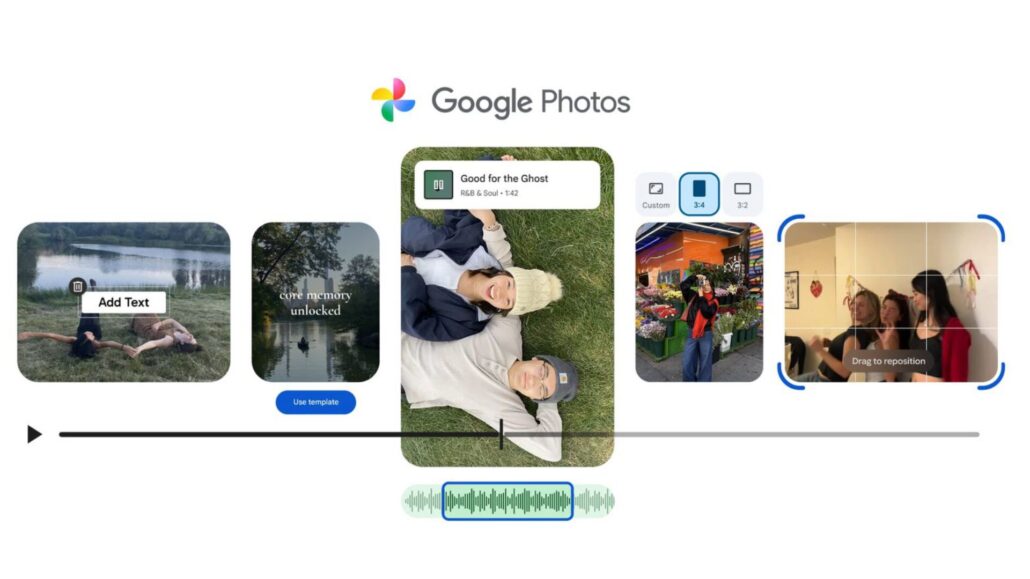
The headline feature of the update is the new “universal timeline.” While this sounds standard to anyone who has used Adobe Premiere or Final Cut, its arrival in a default gallery app is a significant paradigm shift. Previously, editing a video in Google Photos meant simply trimming a single clip. If you wanted to stitch three videos together with music, you had to export files and import them into a third-party tool like Splice or InShot.
Google’s new update removes that friction using what they call an Adaptive Canvas. This new interface automatically resizes your workspace to fit vertical or horizontal video, allowing you to layer audio, stack multiple clips, and arrange photos into a cohesive narrative without ever leaving your library. For the average user, the friction of downloading a separate editing app was often the barrier between having a video and sharing a story. Google has just removed that barrier.
Automated “Beat-Sync” Creativity on Android
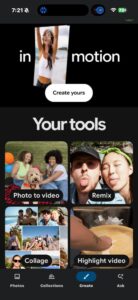
While the core timeline features are launching on iOS today, Google is playing a savvy ecosystem game with its automated tools. The new AI-driven Highlight Video templates are debuting primarily on Android. Accessed via the “Create” tab, these templates don’t just mash clips together; they automatically sync cuts to the beat of the music.
Additionally, Android users are getting exclusive “expressive” text tools, allowing for custom fonts, colors, and backgrounds that can be layered over the video. This creates a fascinating tension for iPhone users. Google Photos is arguably now a more capable video editor than Apple’s native Photos app, but the “smartest” features are reserved for Google’s own OS. Apple’s solution has always been to push users toward iMovie or the newer Final Cut Pro for iPad, keeping the main Photos interface clean. Google’s approach is messier but more practical: put the tools where the media lives.
The New Default for Single Clips
Perhaps the most aggressive move in this update is how it handles single videos. On Android, this new editor is now the default experience. When you open a video and tap “Edit,” you aren’t just given a trim tool anymore; you are dropped into the full timeline environment. This subtly trains millions of users to view their videos as starting points for creation rather than finished static assets.
Sherlocking the “Middle-Tier” Editors
The biggest losers today aren’t Apple or Google, but the developers of “middle-tier” video editors. Apps that charge $4.99 a month for basic timeline editing and stock music libraries just lost their primary value proposition. With Google Photos now offering a licensed music library, multi-clip support, and AI beat-matching for free, the “casual creator” market is being absorbed by the platform holder.
The Verdict on Google’s Creative Pivot
For years, we’ve treated our phone galleries as static lists of JPEGs and MP4s. Google’s update acknowledges a reality that social media solidified years ago: photos and videos are raw materials, not finished products. By turning its storage app into a creation suite, Google has set a new standard. The ball is now in Apple’s court to decide if its own Photos app will remain a museum, or if it will finally let users touch the exhibits.








Leave a Reply
Want to join the discussion?Feel free to contribute!