
The Blink Mini 2K+ Is The $25 Fix For A Dumb Everyday Problem
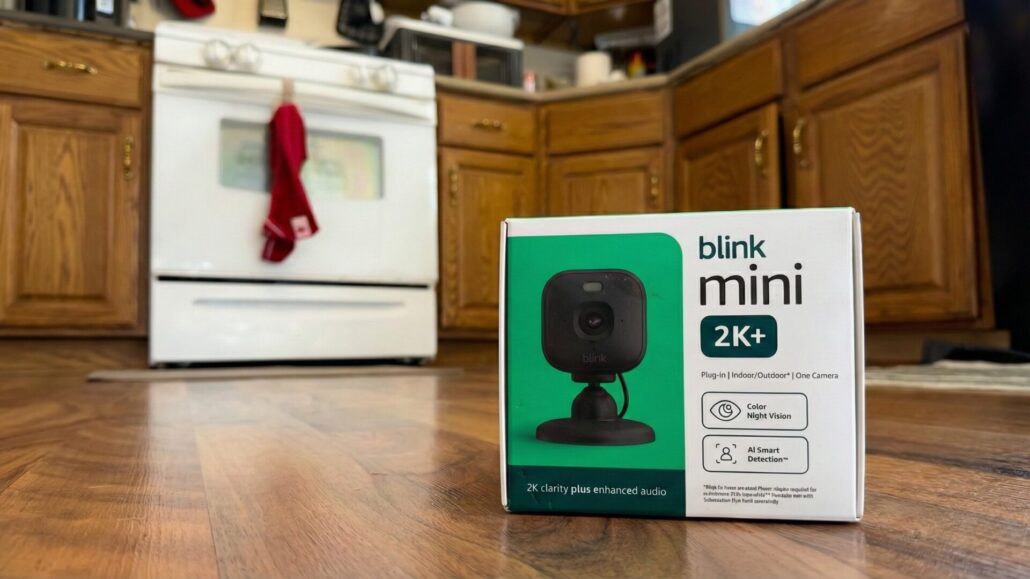
I bought the Blink Mini 2K+ for a genuinely dumb reason: my washing machine lives downstairs and lies about how long it has left. Instead of doing the “is it done yet?” staircase shuffle three times per load, I wanted a cheap indoor camera I could set up in minutes and forget about. After a week of use, the Mini 2K+ has been rock-solid, the video quality is shockingly good for the price, and the only real knock is that the little base mount feels easier to bump loose than it should.
Blink Mini 2K+
A cheap, plug-in indoor camera with legitimately great video—perfect for “is the laundry done yet?” levels of monitoring.
- + Easy setup: Up and running fast with minimal fuss.
- + Excellent video quality: Clear enough to read a washing machine timer from upstairs.
- + Compact design: Small, discreet, and easy to place.
- + Great value: Especially if you already use Blink gear.
- – Base feels insecure: Easy to knock the camera off the stand.
- – Placement matters: If it’s in a bump-prone spot, you’ll notice the stand issue more.
- – Ecosystem tradeoffs: Best if you’re fine living in Blink’s app/world.
What It Is And What It Costs
The Blink Mini 2K+ is Blink’s compact plug-in indoor camera with up to 2K (2560 x 1440) video, a built-in spotlight for better low-light views, two-way talk with noise cancellation, and a built-in siren. It can be used outdoors too, but only if you pair it with Blink’s weather-resistant power adapter.
Price-wise, it’s pitched as a roughly $50-ish camera—but like every Blink product ever, it’s constantly getting chopped in half during sales. I paid $25 on Amazon, which is honestly the price where this thing stops being a “maybe” and becomes a “why not?”

In The Box
Everything you need to plug it in and get moving.

The Main Event
Tiny camera, big upgrade in clarity versus bargain cams.

Setup Is Basically A QR Code
Scan, add, done. Blink makes onboarding painless.
Setup And Daily Use
I had this camera up and running in minutes. Plug it in, follow the app’s prompts, and you’re basically done. No Sync Module required.
And yes: my use case is deeply stupid. I bought it to watch the washing machine timer from upstairs.
My washer loves to lie. It’ll say a load has 30 minutes left, and then—surprise—it’s actually got 55 minutes of dread and procrastination ahead. Instead of walking downstairs to check if laundry is done (it’s not), I now just glance at my phone. It’s the laziest smart home win I’ve had in a while.
Easy Add-On If You Already Use Blink
If you’ve already got Blink stuff in your house, adding the Mini 2K+ is basically a formality. Open the Blink app, hit the “+” to add a device, scan the code, and it drops into your existing setup without you having to rebuild anything from scratch. Your current camera groups, alert settings, and routines are right there waiting. So you can treat it like “one more room” instead of “new project.” It’s especially painless if you’re already paying for a Blink plan, since the Mini 2K+ just joins the same subscription setup and behaves like the rest of your fleet.
Video Quality And Audio
Here’s the part that matters: the video looks great for the price.
- In normal lighting, the 2K feed is sharp enough that you’re not playing “guess that blob.”
- In low light, the camera has a spotlight and can keep color going when there’s enough ambient light—otherwise it falls back to IR black-and-white.
- Two-way audio is clean and loud enough for normal “hey, stop doing that” situations, and the noise cancellation helps keep it from sounding like you’re talking through a tin can.
Is it competing with premium cameras that cost 3–5x more? No. But at $25–$50, it’s embarrassingly easy to recommend.
Design And Mounting
The Mini 2K+ is tiny—roughly a small cube—and it disappears on a shelf. That’s a compliment.
My only real gripe: the base/stand doesn’t feel as secure as it should. It’s a little too easy to knock the camera off the mount when you’re adjusting it, dusting, or just generally existing near it. It’s not a dealbreaker, but it’s also the exact kind of “cheap accessory” problem that makes you mutter under your breath.
If you’re putting this somewhere a kid, a dog, or a flailing adult arm can bump it, consider mounting it more permanently instead of trusting the stand.
App, Alerts, And Smart Features
The Blink app is straightforward: live view, motion alerts, and a bunch of toggles that let you tune sensitivity so you’re not getting pinged every time light shifts.
A couple things worth knowing:
- Smart Detection (person + vehicle detection) is a subscription feature (or you’ll get it during the trial).
- You can also use the Mini 2K+ as a chime for a Blink Video Doorbell, which is genuinely handy if you don’t want another dedicated chime box.
- It’s a 2.4GHz Wi‑Fi device, so if your home network is “5GHz-only and proud,” you’re going to have a bad time.
Storage And Subscription Reality Check
Blink’s world works like this:
- Out of the box, you’ll likely get a trial of cloud features.
- After that, cloud recording and the fancier features are behind Blink’s subscription (Basic/Plus).
- If you want “local storage,” you can do it—but it’s not the camera magically recording to a microSD card. You’ll need a compatible Sync Module and a drive/card, depending on which module you’re using.
None of this is uniquely evil—every camera company does some version of it. But it’s the part you should know before you get attached to features you only have during the trial.
Alternatives
If you want a similar vibe but different tradeoffs:
- Blink Mini 2 (1080p): Cheaper, lower resolution. If you don’t care about 2K sharpness, it’s the “fine, whatever” option.
- Wyze Cam v4: Also wired, higher-res 2.5K on paper, and a strong value if you like Wyze’s ecosystem.
- TP-Link Tapo C120: 2K, local storage via microSD, and generally a good pick if you want less subscription pressure.
Blink Mini 2K+ Vs. YooSee Mysight K09
I have already tried the bargain route with the YooSee Mysight K09, and it can work fine for basic indoor monitoring if you just want a quick live view and simple motion alerts. But for this specific job, reading a washing machine timer from across the room, it came up short.
I initially mounted the YooSee in the laundry room, and from where it was positioned the resolution and overall clarity were not high enough to read the washer timer easily. I could sort of make it out, but it was the kind of soft, fuzzy detail that turns a “quick glance” into squinting and guessing.
The Blink Mini 2K+ solved that immediately. The picture is sharper and cleaner, and small details stay readable from farther away, which is the whole point of this setup. On top of that, if you already use Blink, adding the Mini 2K+ is straightforward and it fits right into the same app and setup you are already using.
Who Should Buy It And Who Should Skip It
Buy It If…
- You want a cheap indoor security/pet camera that’s easy to set up.
- You’re already using Blink devices and want everything in one app.
- You care about video quality, but you’re not trying to fund a camera company’s yacht.
Skip It If…
- You need a stand that’s rock-solid in a bump-prone spot.
- You want a camera built around local-first storage without buying extra hardware.
- You’re deep in the Apple Home universe and want a camera that feels native there.
The Cheap Mounting Upgrade I’d Actually Recommend

One quick add-on that’s absolutely worth it is the 3 Pack Blink Adhesive Wall Mount Bracket. I grabbed a set for about $8 and it made placement way easier, especially if you don’t feel like drilling holes. For a few bucks, it’s the difference between “this is fine on a shelf” and “this is exactly where I want it, staying put.”
The Bottom Line
This is exactly the kind of product I want cheap smart home gear to be: small, simple, and good enough that I don’t feel like I’m settling.
Also, I can’t overstate how satisfying it is to use a security camera for something this dumb. My washer can lie all it wants. I have receipts now.
Final Verdict
If you’re looking for an affordable, easy-to-install security camera, this is exactly what you need.
The Blink Mini 2K+ nails the basics—setup, video quality, and day-to-day usability—and only loses half a star for a stand that feels a little too eager to let go of the camera. For $25 on sale, it’s a steal. For around $50, it’s still a strong pick as long as you understand Blink’s subscription and storage ecosystem.






Leave a Reply
Want to join the discussion?Feel free to contribute!