
OpenAI Just Put an App Store Inside ChatGPT
OpenAI is tired of being the chatbot you visit; it wants to be the platform you live in.
In its latest move to cement ChatGPT as the default starting point for the internet, OpenAI has launched an integrated App Directory. And this isn’t just a cosmetic update, either. It is a fundamental shift in how the AI interacts with your data and the third-party services you use every day. By opening up a path for developers to submit their own “chat-native” experiences, OpenAI is signaling that the era of the “AI wrapper” is ending and the era of the “AI ecosystem” has begun.

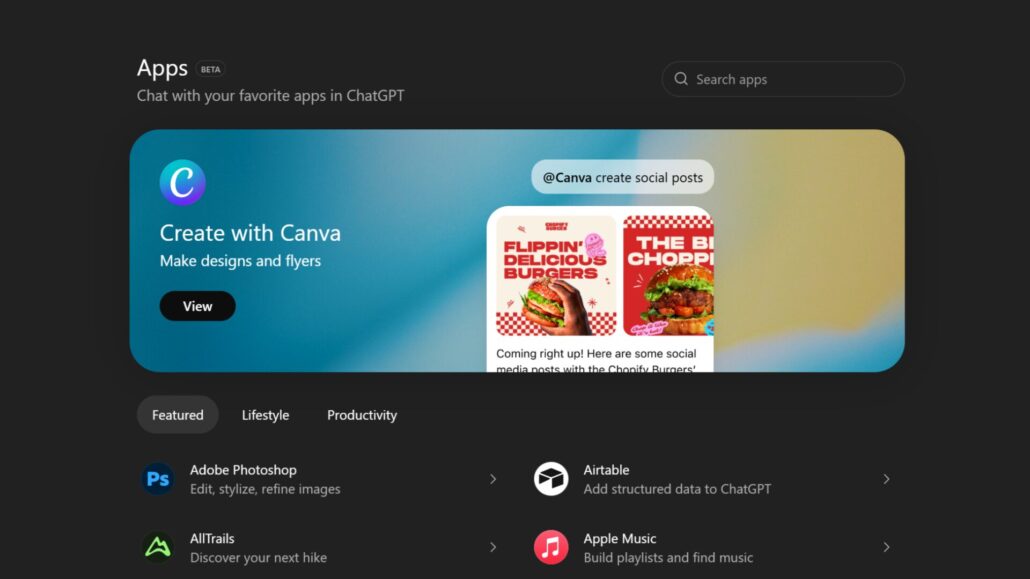
ChatGPT Now Has an App Store Inside It
OpenAI added an in-app Apps Directory for ChatGPT and opened submissions for developers, turning “tools” and “connectors” into a real platform layer.
- Discovery Finally Exists: There’s now a built-in Apps Directory (including a web entry point) so you can browse integrations instead of guessing which magic prompt unlocks them.
- “Apps” Means More Than UI: OpenAI is bundling interactive apps and what used to be connectors under the same umbrella — basically, fun integrations and serious “connect my stuff” plumbing in one place.
- Developers Can Submit (With Review): OpenAI’s pushing an Apps SDK built around MCP, with app submissions and approvals rolling out over time. It’s not instant, and the floodgates likely open gradually.
The Death of the “Magic Phrase”
For months, using ChatGPT with external tools felt like a dark art. You had to know exactly which “connector” was active or remember the specific phrasing to trigger a Google Drive search.
The new App Directory, accessible at chatgpt.com/apps or directly within the interface, solves the discoverability problem. Everything, from “plumbing” tools like Dropbox and Google Drive to interactive experiences like Spotify or Canva, now lives under the single umbrella of “Apps.”
The discoverability shift is huge. Instead of guessing if a service exists, you browse for it. Once connected, you can call these apps into action via @ mentions in your prompt or by selecting them from a dedicated tools menu. OpenAI is also experimenting with “intent-based” surfacing, where ChatGPT suggests an app it thinks you need based on the context of your conversation. It’s a fine line between “helpful assistant” and “aggressive upselling,” and one we’ll be watching closely.
Plumbing vs. Performance
OpenAI is using “Apps” as a catch-all term for two very different things:
- Interactive UIs: These are the flashy integrations. Think DoorDash cards, Apple Music playlists, or Figma previews that live directly inside your chat thread.
- Data Connectors: These are the “boring” but essential tools. They allow ChatGPT to index your files, perform deep research across multiple sources, and reference your personal documents.
By folding both into the same directory, OpenAI is effectively turning ChatGPT into a browser-plus-storefront hybrid. They aren’t just trying to give you a better search box; they want to be the place where you find the item, research it, and hit the checkout button without ever changing tabs.
The SDK and the MCP Standard
For the nerds in the room: this isn’t just a walled garden. Developers are building these apps using OpenAI’s new Apps SDK, which is built on the Model Context Protocol (MCP). This is an open standard that allows developers to define both the logic of how an app works and the UI components it displays.
However, don’t expect a gold rush overnight. OpenAI is keeping a tight grip on the reins with a manual review process. While early partners like Zillow, Expedia, and Coursera are already live, the real flood of third-party listings likely won’t hit its stride until well into 2026.
The Privacy Tax
As with any platform play, the currency is your data. Apps can access the context of your current conversation, and if you have “Memory” enabled, they can potentially tap into that long-term context too.
The model training rules are a bit of a maze. If you’re on a Business, Enterprise, or Edu plan, your data is shielded by default. But if you’re a Free, Plus, or Pro user, your interactions with these apps can be used to train OpenAI’s models unless you manually dive into your settings and toggle off “Improve the model for everyone.”
As always, treat these app permissions like you would a browser extension. If you wouldn’t give a random Chrome extension access to your Google Drive, don’t give it to a ChatGPT app.
Tony’s Take: A Helpful Ecosystem or a Cluttered Mall?
This is the most obvious bet in tech right now: if you own the platform, you own the habit.
By building an app store, OpenAI is taking a direct shot at Google Search and the Apple/Microsoft ecosystems. The promise is “fewer tabs, more doing.” When it works—like when ChatGPT finds that one obscure PDF in your Dropbox and turns it into a summary without you leaving the window—it feels like the future.
But there’s a dark side. Every app store eventually attracts spam, “GPT-wrappers” of questionable utility, and dark patterns. OpenAI’s success here won’t be measured by how many thousands of apps they have, but by how well they curate them. If the “recommended” apps become a wall of AI-generated noise, users will retreat back to their browsers.
For now, the App Directory is a glimpse of ChatGPT’s endgame: becoming the OS for the AI era. It’s convenient, it’s powerful, and it’s a privacy minefield.
Proceed with your eyes open.








Leave a Reply
Want to join the discussion?Feel free to contribute!