

The hardest part of choosing an AI agent is deciding which kind of management job you want.
Do you want one assistant that keeps track of your work? A roster of specialists you can hand jobs to? Something you can reach through WhatsApp without maintaining a server? Or an agent whose models, tools, memory, and infrastructure you control?
That’s the useful starting point for comparing OpenAI dots, Grok Bot, Meta Muse, and Hermes Agent. All four belong in the working-agent conversation. The differences get interesting when you ask who runs the system, what it can touch, how it handles a blocked task, and what completed work actually costs.
A beautiful answer is nice. An editable file in the right place, with the right permissions, is better.
Scope and disclosure: This is a researched buyer’s guide, with product details checked October 1, 2026. I use Hermes and have been working with my OpenAI dot, Snoop. I also build Hermes Fleet and HermesGPT, independent companion projects in the Hermes ecosystem. I’m not a Nous Research employee. My dot assisted with this article’s research and drafting. This project did not include a controlled hands-on comparison of all four products. Recommendations below combine documented capabilities with my editorial judgment. Rolling documentation can describe features that depend on your plan, region, build, or account rollout.
The quick answer
- Start with dots if you already organize serious work around ChatGPT and Work/Codex. Its continuing assistant relationship and task coordination are the draw. Check eligibility before treating it as part of your current plan.
- Start with Grok Bot if you want a managed roster of persistent specialists. Its visible roles and handoffs fit that style of delegation. Those specialists don’t automatically get separate security boundaries.
- Start with Meta Muse if you want to try an everyday managed agent with a free entry point. Mobile access, WhatsApp, and personal or small-business workflows make it a sensible first trial where available. Review its data defaults first.
- Start with Hermes if control over models, deployment, and retained work is the requirement. It offers the most direct path here to operating your own agent. You also inherit more of the operational responsibility.
Those are four different purchasing decisions. A single “smartest agent” trophy would obscure most of them.
Four ways to hand over work
| Agent | Delegation style | Strongest reason to choose it | Main trade-off |
|---|---|---|---|
| OpenAI dots | One continuing assistant that coordinates tasks | Continuity across ChatGPT context and Work/Codex workflows | Eligible-plan cost, rollout, and separate task limits |
| Grok Bot | A roster of persistent specialist Bots | Managed collaboration and visible handoffs | Shared resources across personal Bots and usage-based limits |
| Meta Muse | A continuing personal agent with side chats | Accessible everyday workflows and a free allowance | Data defaults, regional access, and vendor dependence |
| Hermes Agent | Configurable agents, profiles, skills, and routines | Deployment, model, and state control | More setup and maintenance when self-hosted |
The sections below explain the evidence behind those judgments. None of these rows measures accuracy, speed, or reliability.
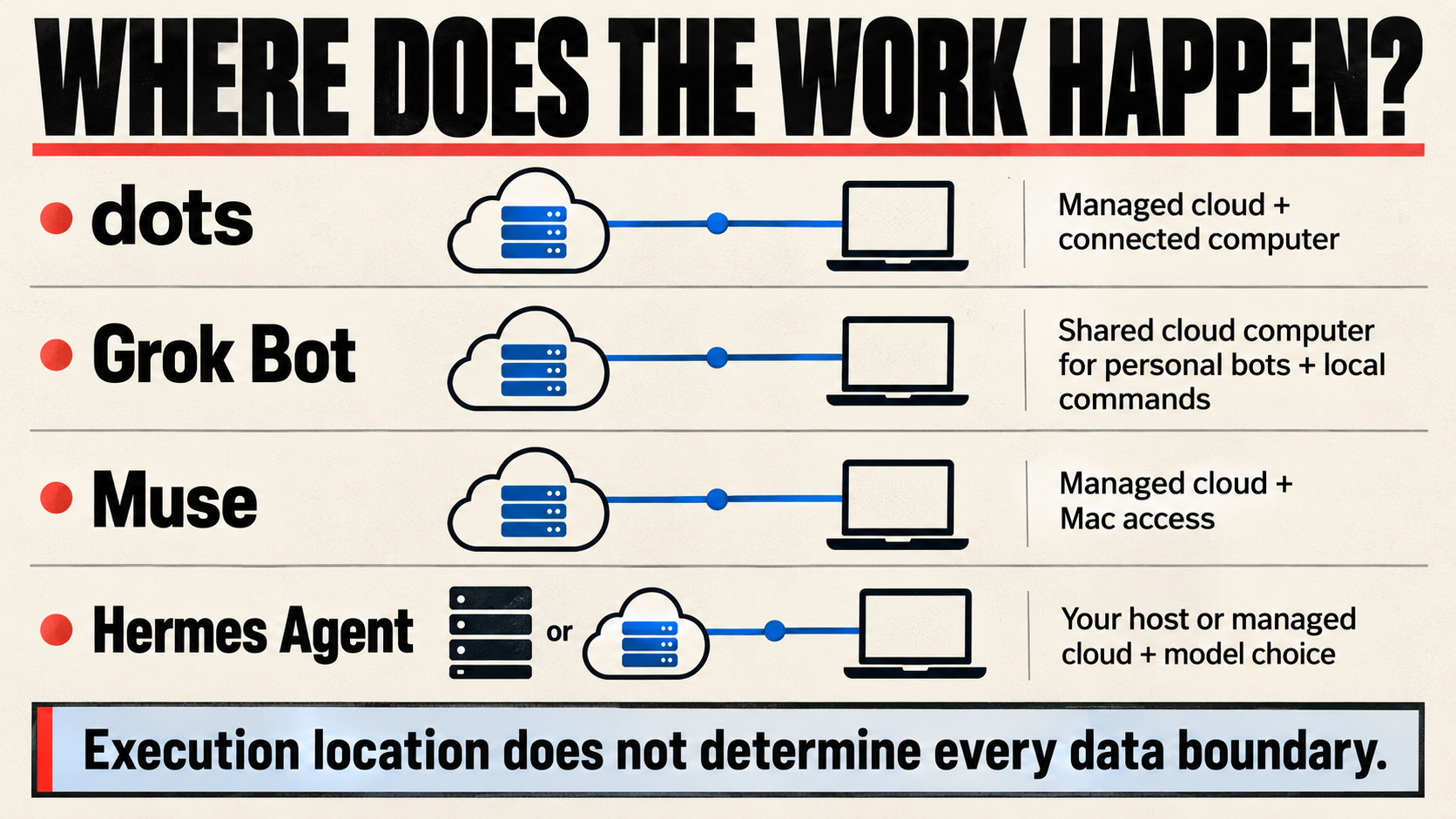
The execution routes are worth separating from the start. An agent can run on your computer while still sending context to a remote model. A managed cloud agent can also have permission to reach local files.
OpenAI dots: one relationship, several places to work
The clearest reason to pick dots is continuity. OpenAI describes a personal agent that carries relevant context, preferences, decisions, and responsibilities between conversations. It can pursue assigned work, split it into parallel tasks, and resume when there’s a reason to continue. That doesn’t promise perfect recall, and connecting a source isn’t itself an instruction to monitor it. OpenAI’s tasks and memory guide explains the distinction.
I like this arrangement for work that refuses to stay inside one neat project folder. Research becomes a decision. The decision becomes a document. The document exposes a website change. Someone still needs to keep track of why all three belong together.
dots has its own cloud computer and browser, which can work while your devices are off. It can also use a connected personal computer and start Work/Codex tasks. Local execution has different requirements: the computer needs to be online with the ChatGPT app open. A cloud browser session doesn’t magically inherit the logins in your laptop’s browser. OpenAI’s computer and app documentation is worth reading before assuming that “connected” means everything is connected.
For an existing ChatGPT user, the appeal is building on a familiar working environment. The catch is that eligibility is specific. OpenAI lists a gradual rollout for Pro 100, 200, and 500 for adults over 18 outside the EEA, UK, and Switzerland, plus Business Premium and admin-enabled Enterprise worldwide. An eligible plan still doesn’t guarantee immediate access. Current dots access requirements should settle that question before you upgrade.
My recommendation: dots makes the most sense when the persistent assistant is the center of your workflow and individual coding or research jobs branch off from it. If your main requirement is choosing the assistant’s model provider or moving its complete runtime onto your own infrastructure, Hermes is the more appropriate starting point.
What actually happened with Snoop
In my current TRT work, I asked Snoop to research the site and help refocus it. The work crossed Google and Bing search data, analytics, an article correction I approved, and a separate Codex task on my Mac for theme code.

That gave me a useful, unglamorous view of the category. Approvals timed out. Some questions needed actual source exports. Local coding work needed its own coordination. The assistant relationship helped hold the work together, but it didn’t remove every permission prompt or missing-data problem.
I’m not presenting that as a finished site rebuild or a four-product benchmark. It’s a concrete example of the thing I’d test: can the assistant preserve the thread of a real job when the job crosses tools, machines, and approvals?
That’s where an agent earns its keep. The demo usually cuts away before that part.
Grok Bot: specialists you can actually organize
Grok Bot’s strongest pitch is the roster. You can have persistent Bots with different roles, work with several at once, and let them hand work to each other. Group chats support two to six Bots, with asynchronous collaboration visible in the conversation. The collaboration documentation describes the mechanics.

For someone who naturally thinks in roles, that structure matters. A researcher, editor, and implementation specialist can be easier to supervise than one long conversation carrying every responsibility. My earlier Grok Bot launch coverage explored that teammate framing. The current documentation is the source for today’s features and access.
Here’s the detail I’d put in bold before creating a whole pretend department: personal Bots share the account’s cloud computer and authenticated resources. Files, browser sessions, credentials, and connectors can be shared even though each Bot has a separate screen. The docs put it plainly: “The screens are separate work surfaces, not separate security boundaries.” Grok Bot’s computer model makes this explicit.
A Bot named “Research Only” isn’t a substitute for a technical restriction. The name can organize your work. It can’t carry your security policy by itself.
Grok Bot also supports local commands and file work through its desktop app, with per-command approval as the default. It isn’t limited to a hosted browser. Another important distinction: the product doesn’t offer a consumer model picker. Cursor manages model routing, so the Grok name doesn’t establish one fixed, exclusive backend for every job. The security and model documentation covers both points.
The account arrangement deserves a minute of attention, too. Paid individual Cursor plans and Cursor Teams qualify; eligible individual Grok plans can provide access through account linking. Grok Bot still uses a Cursor account. Check the current linking guide, especially if you’re assuming an existing subscription qualifies. Choose the receiving Cursor account carefully: the guide says a Grok or X link is permanent and can’t be unlinked or moved.
I’d favor Grok Bot over dots when a visible specialist roster is how you want to manage the work. I’d favor Hermes when those specialists need separately configured models, credentials, and deployment choices. Organizational clarity and operational control solve different problems.
Meta Muse: the most approachable first trial here
Muse in this comparison means Meta’s personal AI agent. Meta introduced it on September 8, 2026, with continuing assistance and a WhatsApp interface. It’s distinct from Muse Code, the terminal coding product. Meta’s launch announcement establishes which product we’re discussing.

Muse’s main conversation and side chats give you a continuing assistant without making you wait for one job to finish before assigning another. Its official app options include web, iOS, Android, and Mac. Meta’s getting-started guide and download page describe those entry points.
This is a substantial agent product. Meta documents a dedicated Linux cloud VM with a browser, filesystem, and terminal. It can create tools and run delegated or scheduled work. The company also describes a separate authorization system and credential handling outside the main agent runtime. Those are architecture claims, not independent proof that mistakes or prompt injection have disappeared. Meta’s security paper acknowledges the remaining risks.
For practical work, Muse can produce documents, spreadsheets, source code, and interactive browser-based tools. Meta says artifacts remain private until sharing is enabled or approved. Its September 29 small-business update adds skills and integrations for business workflows, including services such as Shopify, QuickBooks, Slack, and Stripe. Connector support doesn’t mean every possible action in those services is available. Artifact help and the small-business announcement supply the details.
The main reason I’d recommend trying Muse first is the combination of managed infrastructure, familiar communication surfaces, and a free usage allowance. Current business-facing availability lists the US and Canada for adults 18 and older. Check your account and region rather than assuming a global rollout. Muse’s current business FAQ is the clearest published availability reference we found.
The first stop after setup should be Data controls. Meta’s help says model-improvement use starts enabled and can be turned off. It also says Muse conversations and VM data aren’t shared with Meta’s advertising systems. That claim doesn’t mean every action you take through an external site becomes invisible to that site’s advertising machinery. Muse’s privacy guidance makes the distinctions worth reviewing.
I’d choose Muse for a low-commitment trial of an everyday personal or small-business agent. I’d hesitate if the first requirement were self-hosting or avoiding Meta’s managed environment entirely. That’s a fit decision, not a prediction about answer quality.
Hermes Agent: you get the controls and the maintenance bill
Hermes is the clear choice in this group when operating the agent yourself is part of the point.
Nous Research’s MIT-licensed Hermes Agent gives you the underlying software. You can choose the deployment, configure model providers, and retain the agent’s working state. Hermes also offers managed cloud hosting, so self-hosting is an option rather than a compulsory initiation ritual.
The old “powerful, but you have to live in a terminal” description is stale. Hermes Desktop uses the same agent core, sessions, memory, and skills as the CLI and gateway. My Hermes Desktop guide covers that relationship in more detail. Packaging still varies by platform, so check the current support matrix rather than assuming identical installers everywhere.
Model choice is a meaningful advantage. Hermes lets you configure providers and compatible endpoints, including separate choices for auxiliary work. Local inference is supported. The managed Local Models Desktop interface is enabled in canary builds; other Desktop builds require the documented --local launch flag. Choosing a local model doesn’t establish that it’ll match a hosted frontier model on your workload. Model configuration and local-model documentation explain the actual options.
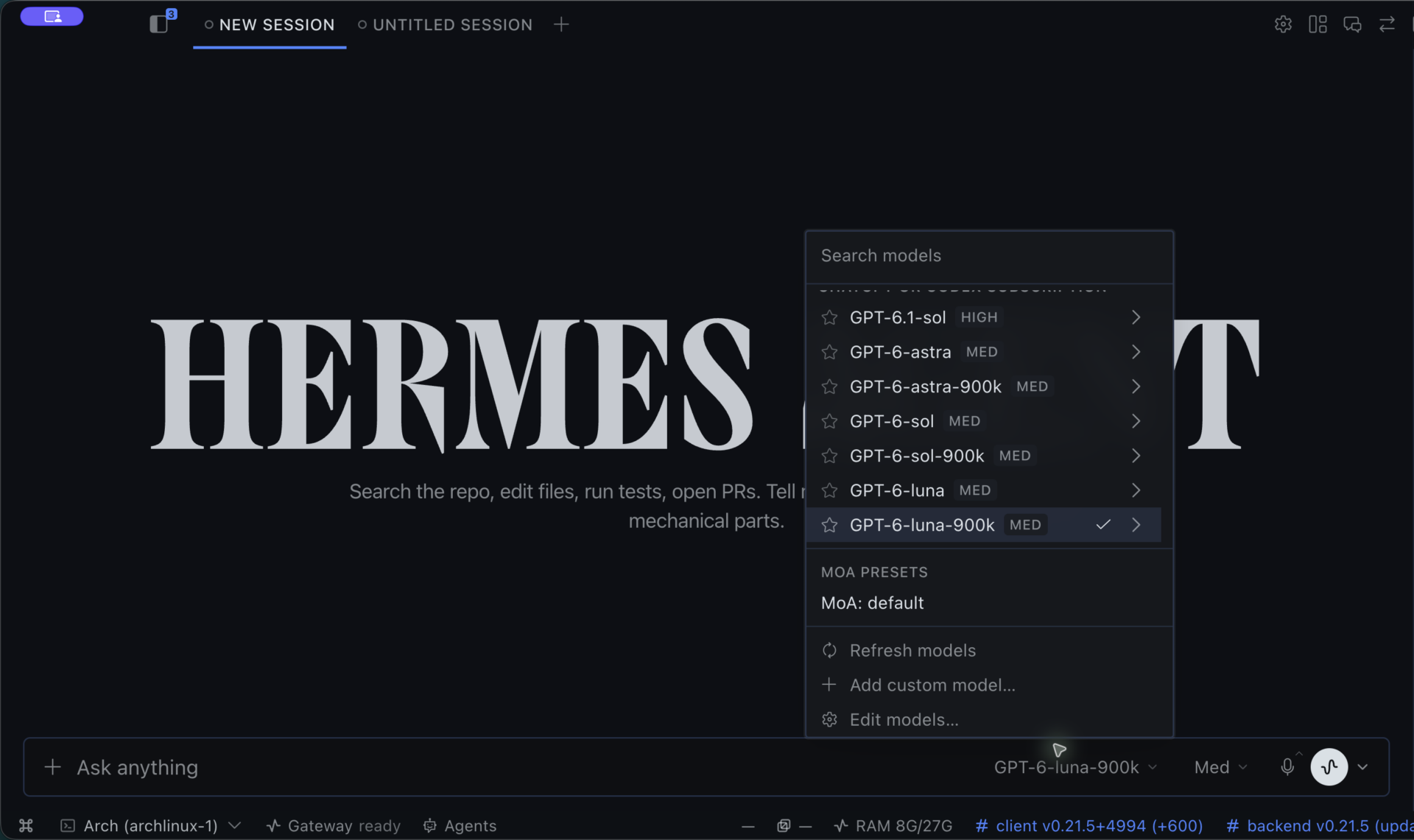
Hermes also has an upstream specialist system. Bot Mode uses profiles with separate configuration, memory, skills, models, credentials, and histories, plus group conversations and routines. Profile separation isn’t OS-level isolation, and the new-Bot dialog copies static API keys from the main profile by default unless you turn that off. Those capabilities belong to Hermes itself; they don’t require my companion projects. The official Bot Mode guide documents the structure, and my Hermes Bot Mode review explains why that structure matters in practice.
The learning pitch needs plain language. Hermes can save and revise procedural skills, and its persistent memory carries context between sessions. That’s useful. It doesn’t mean the underlying model continuously retrains its weights or improves reliably after every task. Skills and memory are concrete mechanisms you can inspect.
Here’s the bill that won’t appear on a subscription page: you’re responsible for more decisions. Execution isolation, credentials, updates, backups, and host uptime all matter. Hermes explicitly warns that its shell and file guards aren’t an operating-system sandbox. Its security documentation deserves more attention than the agent’s avatar.
I prefer Hermes when the agent is becoming infrastructure I want to shape and keep. If you mostly want to delegate a job and let someone else maintain the service, a managed product may be the better purchase. You don’t get extra points for turning a grocery list into a systems administration hobby.
What do they actually cost?
These are published US-dollar prices checked October 1, 2026. They’re different billing models, not equivalent baskets of work. Taxes, regional pricing, plan eligibility, and current account offers can change what you pay.
- dots: OpenAI lists Pro tiers at $100, $200, and $500 a month. Those are bundled ChatGPT subscriptions, not standalone dot fees. Dot conversations don’t consume ChatGPT limits, while commissioned Work/Codex tasks keep their normal limits. OpenAI also describes an extended launch-month allowance for deeper work. Don’t turn that into an unlimited-use promise. ChatGPT pricing and dots usage rules
- Grok Bot: Cursor Pro starts at $20 a month; the Grok Bot landing page lists SuperGrok at $30 a month as another entry route. Included usage resets weekly. Optional on-demand usage bills through Cursor, and an already-running job can finish beyond the monthly cap. Linked plan allowances don’t stack. Cursor pricing, Grok Bot pricing, and billing rules
- Muse: A free plan has a usage limit. Power is $20 a month with 500 million Muse tokens a week; Maximum is $100 a month with 3 billion a week. The official help we retrieved didn’t specify a numeric free allowance. Those token figures aren’t directly comparable with another agent’s completed jobs. Muse subscription details
- Hermes: The agent software is free. Models, tools, hardware, and hosting can cost money. Nous Portal Plus is $20 a month with $22 in monthly credits. Hermes Cloud separately lists $0.56 or $1.09 per running day, depending on size, plus $0.03 per stopped day for retained storage; inference and tools cost extra. Those are optional services, not a required bundle. Portal plans and Cloud pricing
If you already pay for a qualifying subscription, your incremental cost can look very different from a new customer’s. If an agent saves ten minutes but creates twenty minutes of supervision, the cheap plan hasn’t won anything.
The useful calculation is subscription cost plus usage, hosting, and the time you spend supervising or repairing the work. Divide that by jobs you can actually accept. We haven’t measured that figure across these four, so there’s no honest cost-per-result winner here.
Permissions, privacy, and the exit door
Three questions matter before you hand any agent more responsibility: What can it reach? What can it do without asking? What can I take with me if I leave?
For dots, approval checks incorporate instructions, permissions, custom rules, and built-in requirements. ChatGPT data controls apply to eligible conversations and work. Personal-account content may be used for training unless you opt out; Business and Enterprise content is excluded by default. Review OpenAI’s data-use policy for the settings and exceptions. Pausing the main conversation, stopping delegated tasks, and cancelling schedules are separate operations. Ask the assistant to identify what’s still running when you change course. OpenAI’s controls guide
For Grok Bot, training opt-out follows the applicable Cursor account and privacy settings. The service requires stored working data and doesn’t support Legacy Privacy Mode. Deleting one personal Bot doesn’t remove shared files or authenticated sessions from the cloud computer. Its model-based approval system also deserves careful configuration; personal review rules need attention on each desktop installation. Deleting a character from your roster isn’t the same as revoking access. Grok Bot’s approval and privacy guide
For Muse, the Mac app can request Full Disk Access and Automation, alongside app-specific controls. Facebook, Instagram, and Threads can also connect automatically when accounts share Accounts Center. Review those settings before assuming every source required a separate opt-in. Mac access help and connector help
Muse offers data downloads and editable memory files, which makes a blanket claim that proprietary agents imprison all your memory inaccurate. But deleting a chat can leave derived memories, and its forgetting process is best-effort. Data export also doesn’t mean you can transplant the entire hosted service. Muse’s data-management guide
With Hermes, local hosting doesn’t automatically make inference local. A remote model or connected tool can still receive data. Inspect the entire route, including auxiliary models and services. Its exports and backups make migration practical, but full backups can contain credentials. Treat an archive like an archive of your machine, not an innocent document attachment. Nous Portal routing and the Hermes migration FAQ
Across all four, start with a limited workspace and a task that produces a draft. Expand access when the workflow gives you a concrete reason. Agent enthusiasm is abundant. Reversibility is worth protecting.
The test I’d run before committing
Here’s a repeatable evaluation you can use. This is a proposed test, not work we performed across all four products for this article. Use synthetic files or material you’re authorized to share, and keep consequential actions behind approval.
- Give each agent the same bounded job. Ask for a buying brief based on five current primary sources and an editable comparison document. Specify the audience, budget, and destination.
- Change one important fact halfway through. See whether it corrects the final recommendation and dependent claims, rather than adding a contradictory footnote.
- Introduce a blocked source. Disconnect a test integration or use an unavailable file. Record whether it identifies the exact problem and preserves completed work.
- Check continuity later. Correct a preference, return in a new session, and see whether it applies the correction without inventing extra preferences.
- Test the action boundary. Request a draft and explicitly prohibit sending, purchasing, or publishing. Inspect the activity history and final destination.
- Count the whole cost. Record elapsed time, your interventions, factual errors, editable deliverables, and visible usage charges. Note models and builds when exposed, plus any custom configuration.
The winner is the agent that finishes your kind of work with acceptable supervision and access. A confident status message doesn’t count as a delivered artifact.
Which one would I start with?
For an existing ChatGPT power user who wants a continuing assistant to coordinate research, documents, and coding tasks, dots is my first stop, provided the account is eligible.
For someone who wants to manage a visible team of specialists without running the infrastructure, Grok Bot has the clearest fit. Configure access with its shared cloud-computer model for personal Bots in mind.
For a first experiment with a managed everyday agent, Muse is the easiest recommendation to try where available. The free allowance lowers the commitment. Its data defaults still deserve an intentional decision.
For builders who want to choose providers, inspect retained state, and control deployment, Hermes is my pick. That preference comes with an honest acceptance of the maintenance work, and my involvement in its wider ecosystem is part of the disclosure above.
Choose the management model that fits your work. Then give the agent one useful job, a narrow set of permissions, and a definition of done you can verify.
Hand over the keys in stages. Make it earn the next set.
Image credits: cover layout by Tony Reviews Things using original product artwork from OpenAI dots, Grok Bot, Meta Muse, and Hermes/Nous artwork supplied by Tony Simons. Product marks and supplied interface images belong to their respective owners. Their use identifies the products discussed and does not imply endorsement. The execution diagram is an editorial illustration.


