
AI & Software · Review
Hermes Mobile Review: A Promising Early Beta for Your AI Agents
Hermes Mobile puts chats, models, skills and agent controls on your phone. Here is what the early beta does, what I tested, and why it earns 4/5.
 By Tony Simons 10 min read
Disclosure: We may earn a commission when you shop through the links below. It never changes the verdict. Details
Disclosure
We may earn a commission when you shop through the links below. Opinions stay independent. Full disclosure
Hermes finally has an official mobile app. I got into the early beta, connected my setup, and started poking around on my iPhone. My first impression? 4 out of 5. It’s worth installing when you can get access. There’s already a lot here, even if it isn’t quite the fresh start I expected.
Before we go any further: I built Hermes Fleet, my own iPhone app for managing Hermes agents. So yes, I have a dog in this fight. We’ll get to that.
Hermes Mobile: the short version
An official early beta that puts your Hermes agents, conversations and controls on your phone.
My take
- Tested on
- iPhone, early beta
- Developer
- Nous Research
- Access
- iOS and Android beta enrollment
Pros
- Fairly easy setup
- Agent conversations and controls in one mobile interface
- Searchable model picker and broad management surfaces
Cons
- Early beta with room to improve
- Beta access is not guaranteed
- Feels familiar if you expected a completely new app
Opinions are my own. We may earn a commission when you shop through the links below. How I test things →
What Hermes Mobile actually is
Hermes Mobile is the official beta from Nous Research. It gives you a way to reach your Hermes setup from your phone while the agent does its work through that setup. It’s separate from Hermex and from my own Hermes Fleet.
The chat screen groups conversations under agents. On my setup, I could see several agents, expand their sessions, search, and start a new chat. Once you have more than one agent, knowing who you’re talking to without digging through a giant list of conversations is a pretty big deal.
Chat, attachments, and more than a text box
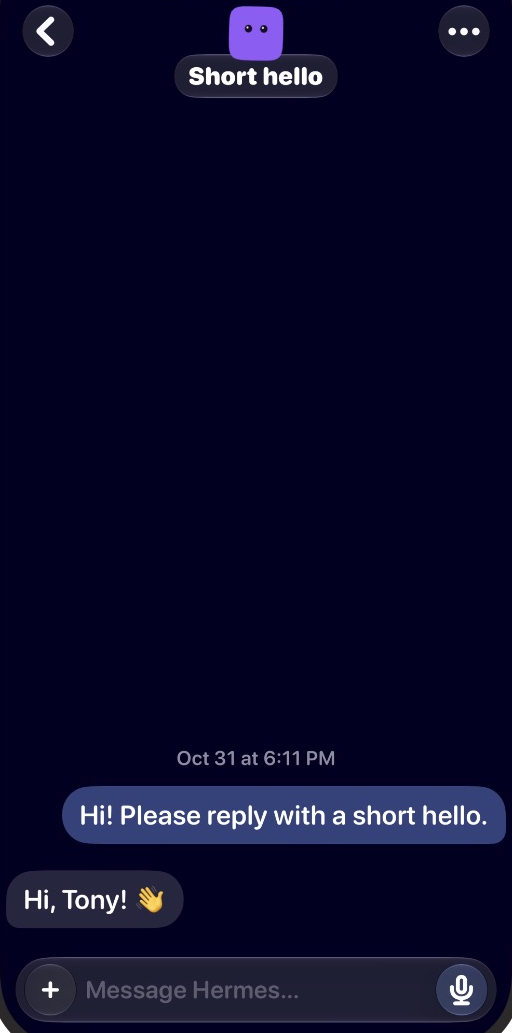
I started a fresh conversation, sent a quick hello, and got a reply. Nothing fancy, but the basic round trip worked. I didn’t put a long-running task, interrupted connection, or complicated approval through its paces here.
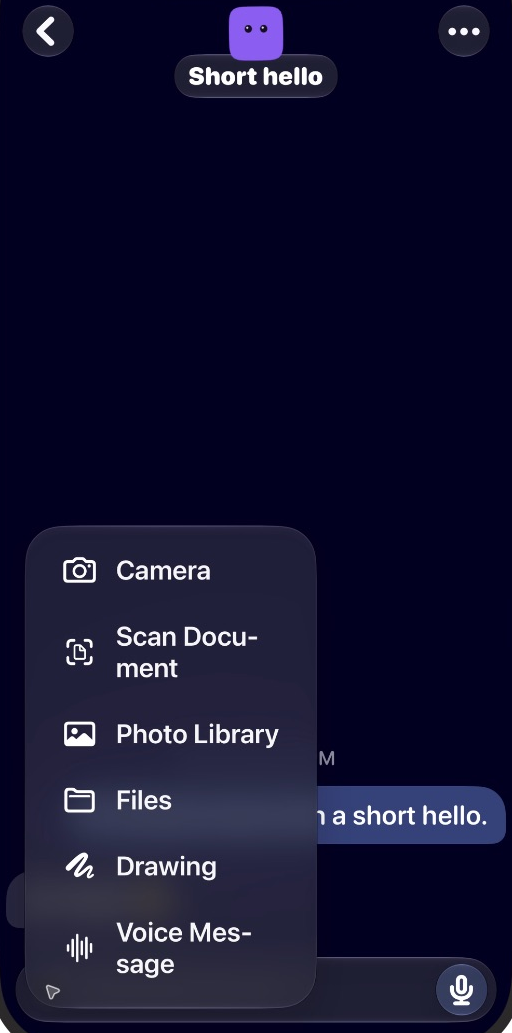
Tap the plus button beside the composer and you get Camera, Scan Document, Photo Library, Files, Drawing, and Voice Message. The conversation menu also lists Live Mode, Terminal, Execution, Routines, and Artifacts. I opened the menus; I didn’t test every one of those workflows.
Still, I like seeing those options here. If I want to start with a photo, a file, or a voice message, the phone should be able to do more than act like a tiny keyboard. What works with your agent will depend on your setup.
The agent dashboard is the interesting part
Switch over to the agent view and things get interesting. The dashboard puts Model and Skills at the top, with Connections, Plugins, and MCP under Integrations. Below that: Projects, Routines, Artifacts, and Kanban. That’s a lot more useful to me than a chat window with a Hermes logo slapped on it.
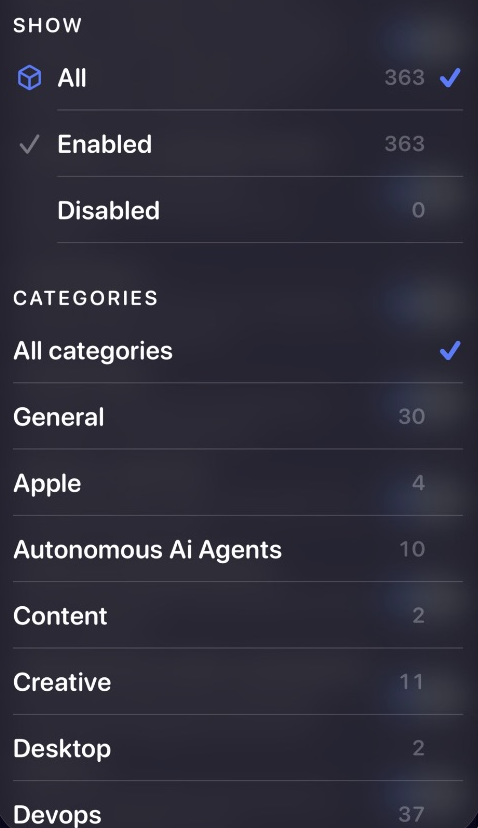
The model picker has search, provider filters, favorites, and the configured default. I opened the catalog without switching models. The choices in my screenshot come from my setup, so yours may look different.
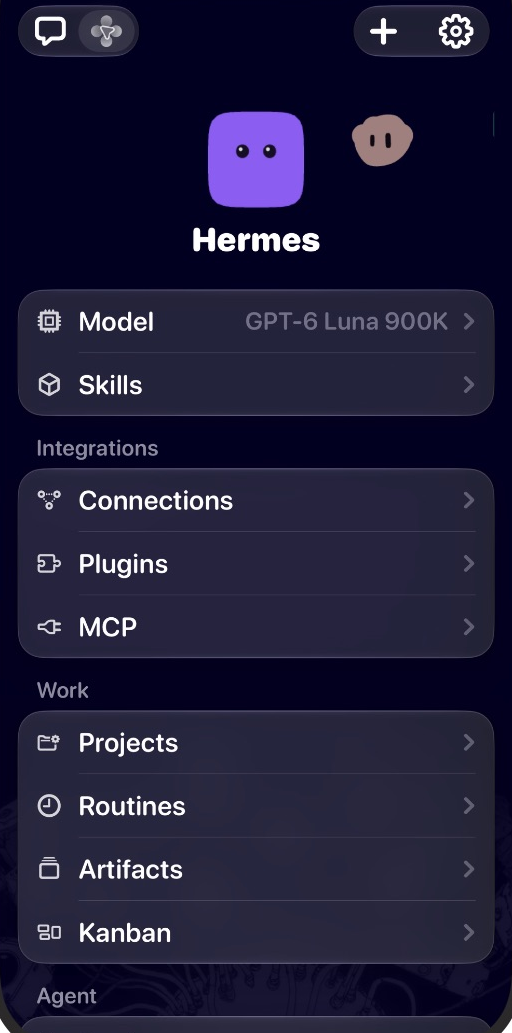
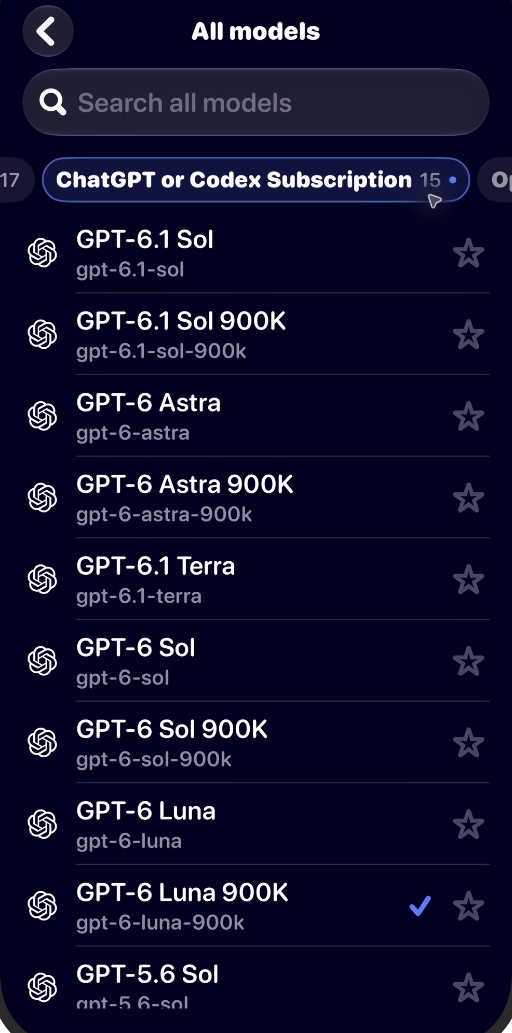
I could also open the installed skills list, existing routines and their schedules, Projects, and Kanban. Projects had no matches under its current filters; Kanban showed a board picker and task search. I didn’t create or edit anything, so I can’t tell you every one of those workflows is ready for prime time.
Skills: actual controls, not just a list
Skills are one of my favorite parts of this beta. You get descriptions and on/off switches for installed skills, plus filters for status and category. My setup has hundreds of them. Being able to narrow that list down on a phone is a whole lot better than scrolling until my thumb gives up. The counts here are mine, not a standard bundle.
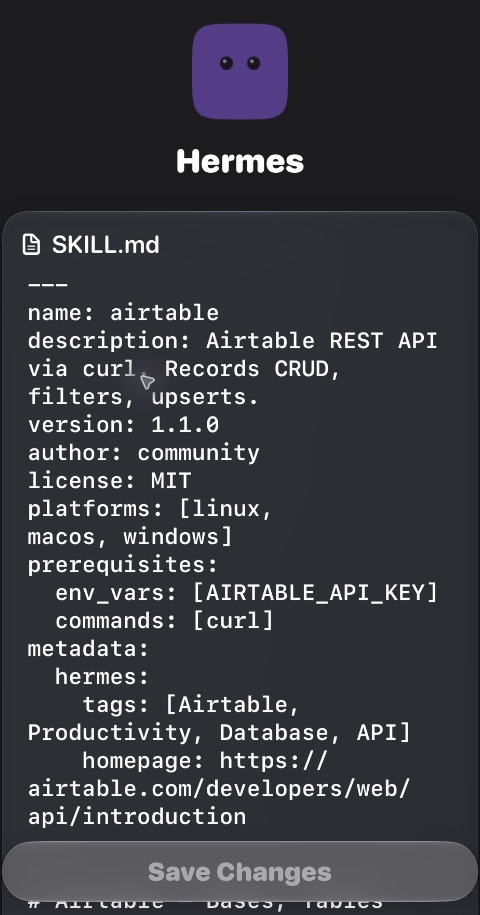
Open a skill and you can actually see its SKILL.md, with a Save Changes control. I opened the Airtable skill to inspect it, but I didn’t save changes, disable anything, or run the integration.
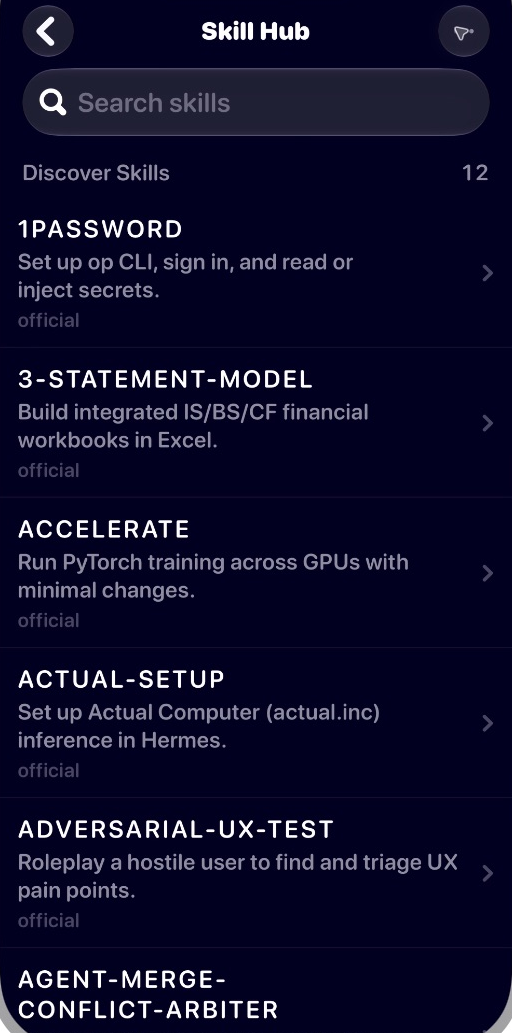
There’s also a searchable Skill Hub with discovery results and source labels. Finding a skill and looking at what it does from the same phone interface? I like that. I browsed the hub but didn’t install anything, so I can’t vouch for the installation flow yet.
Memory, chat history, and on-device caching
Memory and caching sound related, but they’re doing different jobs. Agent memory belongs to Hermes; caching is about what the phone keeps. My Hermes memory guide gets into checking the right agent profile if you want to dig deeper.
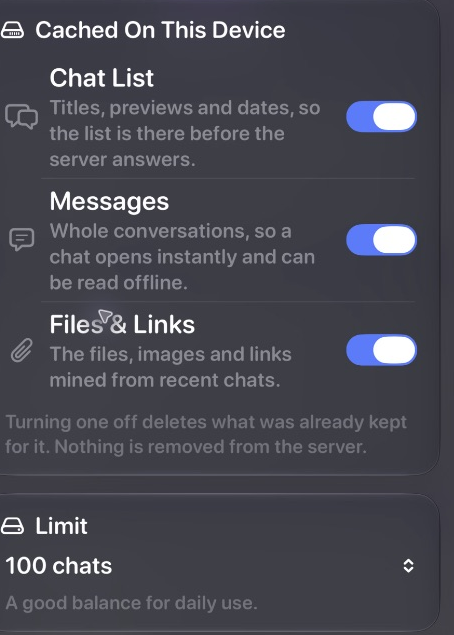
Under App Settings → Caching, there are separate switches for the chat list, full messages, and files and links, plus a chat-count limit and usage readout. The app says cached conversations can be read offline and that disabling a cache category removes the phone’s copy without deleting the server copy. I didn’t disconnect the phone to test that claim.
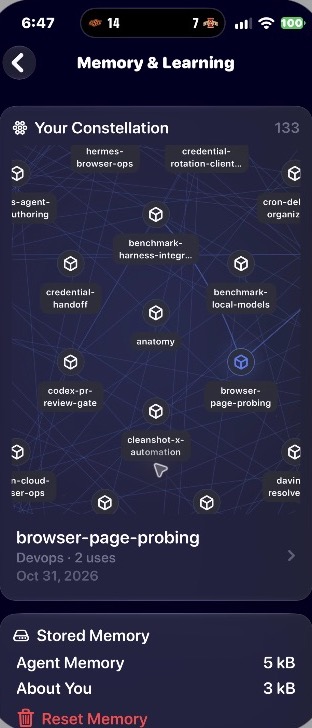
Now for the fun part: Memory & Learning has a constellation of learned skills. Tap a node and you can see its name, category, usage count, and date. It’s a great way to make that information visible without digging around in a terminal.
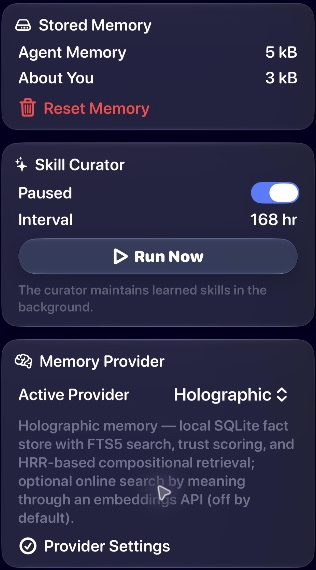
The same screen shows separate Agent Memory and About You sizes, a Reset Memory option, and a Skill Curator with pause, interval, and Run Now controls. My setup showed Holographic as the active memory provider, with its own settings. I didn’t reset memory, run the curator, switch providers, or test recall. Your options and values may differ.
Make the app look and behave like yours
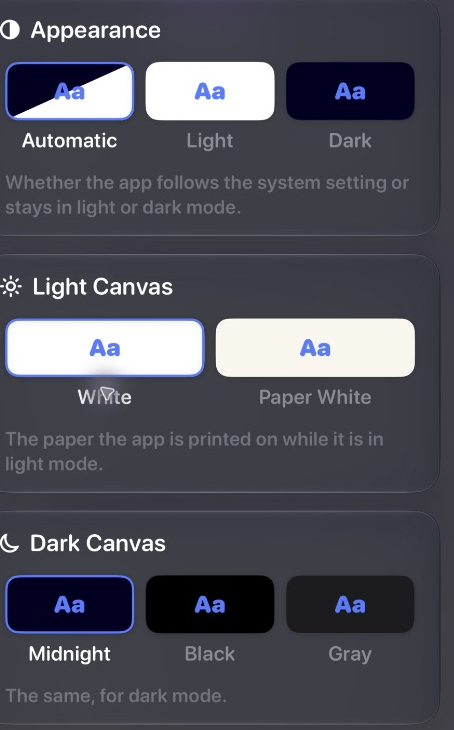
Not everybody likes the interface, but you do get some room to make it yours. Look & Feel has automatic, light, and dark modes, canvas choices, and a font setting. Chat settings offer Bubbles or Classic, a keyboard-after-send option, and switches for generic tool calls, device actions, and thinking when the model shares it. I looked through the options without changing them. Those controls won’t solve every complaint about the layout, but I’m glad they’re here.
MCP, plugins, and routines on a phone
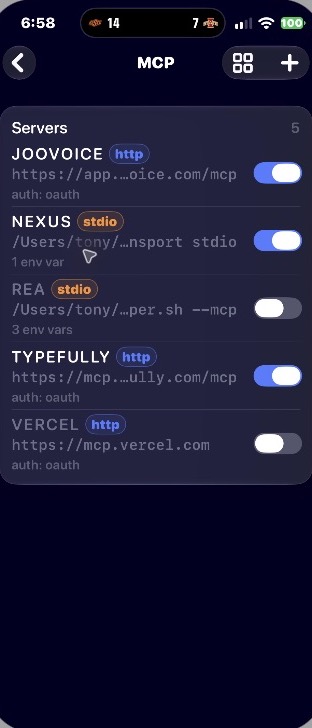
The MCP screen lists configured servers, transport types, and switches. Mine showed HTTP and stdio entries. That’s handy when I want to see what’s configured from the couch, although a switch on a screen doesn’t prove the service behind it is healthy. I didn’t toggle a server or enter credentials.
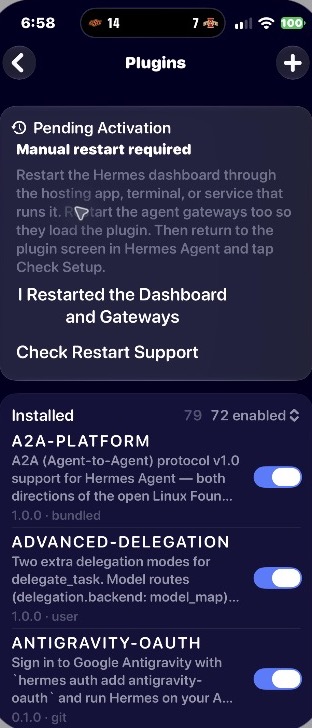
Plugins gets its own list and enabled count. Mine also showed a pending-activation notice saying the dashboard and gateway needed a manual restart. I didn’t restart them. I do appreciate the app telling me what still needs attention instead of making me guess.
Routines showed existing schedules and next-run times. Kanban had a board, status filters, search, and a create control. I didn’t create, change, or run anything in either view, but having those surfaces on the phone is a strong start.
Setup and the Cadu question
Setup was fairly easy for me. How yours goes will depend on your Hermes setup and how your phone reaches it. I wouldn’t promise everyone a five-minute install, and I wouldn’t expose a gateway to the internet without understanding who can access it.
Okay, here’s the part I can’t quite shake: this feels like Cadu rebuilt as the official app. I was hoping the Hermes team would make something fresh and completely new in-house. Instead, I got a strong sense of déjà vu. That doesn’t make the app bad. It just wasn’t the reveal I had imagined.
Cadu’s developer discussed joining Nous to work on mobile, and a community guide describes Cadu as a base for the official app. I haven’t independently verified the exact code history or terms of the arrangement.
And yes, I built Hermes Fleet myself. Could I be a little salty they didn’t pick me? Absolutely. 😂 Take that for what it’s worth.
What the community is saying
The community has opinions. Some people love the clean look; others think the app is cluttered, dislike the fonts or colors, miss Cadu’s design, or see too much Grok Bot. One person found the difference from Desktop confusing. That’s a pretty wide split—and these are individual responses, not a scientific poll.
There’s also plenty of excitement about having agents and their controls in your pocket. I’ve grouped some of the responses below so you can see both sides. If an embed doesn’t load, the post text and source link should still be there.
Positive reactions: the interface (4 posts)
Clean interface for sure-beta’s already looking more polished than most full releases I’ve tried lately.
— @VjxftTwxiffgfs View original post
Modern and clean, looks great
— @MohlerJeff70809 View original post
That UI looks so clean. I cant wait to try it 😀
— @kayleia_ View original post
okay this looks slick, need to see how agents integrate on mobile
— @buildstack_ai View original post
Positive reactions: agents on mobile (3 posts)
Being able to manage agents, MCPs and model settings from one mobile interface could make Hermes much easier to operate day to day
— @Kia_kkk2004 View original post
It’s great, I might do a secondary Hermes install to take it in a different direction than my main agent
— @GuideboardLabs View original post
hermes in my pocket is dangerous lol
— @greenshit333 View original post
Positive reactions: excitement for the beta (3 posts)
💯🔥🔥 we need this yesterday
— @showoffdennis View original post
Looks amazing!
— @arecibo2024 View original post
WANT!
— @progged View original post
Critical reactions: design and Cadu (3 posts)
hopefully the UI will improve. There’s no need to copy the look of Grok. You guys are in a different league.
— @ricosystems View original post
I like the version of Cadu better, the interface, the widgets, the customization of the profiles, I don’t like the typical blue color of Hermes.
— @Danielc54761653 View original post
It’s a little odd that it doesn’t look like the desktop app at all… It’s an entirely new UI and UX… I’m amped for an official app, but this is a confusing direction.
— @charlesmcdowell View original post
One person also reported messages taking more than 20 seconds and repeated reconnects. I didn’t reproduce that issue in my brief chat test, so I’m treating it as a report to watch, not a claim about every installation.
A reported latency and reconnect issue (1 post)
i’m assuming it must be a skill issue on my part but i’m having significant latency / syncing issues 🙁 taking 20+ seconds to send messages and constantly have to reconnect which takes a long time.
— @thatguygeo View original post
Where the beta still needs room
A few views showed a loading state before their contents appeared. They did load for me, but that’s hardly a reliability test. This is early beta software, and I haven’t established offline behavior, notification reliability, long-task recovery, or Android parity. I also didn’t test every attachment, terminal action, integration, or board edit.
If you’re using Hermes for important work, keep another way to reach your setup while the beta matures. I like what I’ve seen; I just haven’t tested enough to call every workflow dependable.
How to get access
Start with the official Hermes Mobile beta page. It links iOS through TestFlight and Android through Firebase App Distribution. Follow the instructions for your platform, and remember that an invitation link doesn’t guarantee an open spot. Nous has warned about apps imitating its branding, so use the official page.
Verdict: 4/5
4 out of 5. Setup was fairly easy, the dashboard puts a surprising amount of Hermes on my phone, and skills, memory, MCP, and routines give me plenty to explore. It’s absolutely worth an install if you can get in. The early-beta edges and my disappointment that this feels so much like Cadu keep it from a perfect score. I’m looking forward to seeing where Nous takes it.
Watch the review
Testing and image notes: I inspected the iPhone beta and verified a short chat exchange. Other views are described as observed, not as fully tested workflows. Screenshots show the real app on my iPhone; the featured image combines two screenshots and the supplied beta invitation with an AI-generated background. Interface imagery: Nous Research.
Reviewed & written by
Tony Simons
Tony has a bachelor's degree from the University of Phoenix and over 14 years of writing experience between multiple publications in the tech, photography, lifestyle, and deal industries.


