

iOS 26.3 Dev Beta 1 Roundup
Early days, but two themes pop: a smoother iPhone-to-Android exit ramp, and a new Notification Forwarding clue that could matter a lot.
- Transfer to Android appears as a built-in Settings flow, aiming to make switching less miserable (and less app-dependent).
- Notification Forwarding shows up in Settings, hinting iPhone alerts could forward to third-party wearables/accessories—not confirmed as a final consumer feature yet.
- Beyond the headline stuff, this looks like a classic beta 1: bug fixes, performance work, and under-the-hood plumbing that won’t look exciting until later.
iOS 26.3 developer beta 1 landed today (December 15, 2025), and, because it’s beta 1, this list is going to change. A lot. I’m rounding up the first real findings as testers and devs dig in.
Beta 1 is usually the “foundation pour,” not the “housewarming party.” It’s where Apple lays plumbing, flips on feature flags, and quietly fixes stuff that never makes a keynote slide.
Still, two things are already interesting in iOS 26.3 beta 1: Apple’s evolving iPhone ↔ Android switching workflow, and a new “Notification Forwarding” discovery that suggests iPhone notifications could land on third-party wearables or accessories. I’m framing this carefully, because beta breadcrumbs are not promises.
What’s new in iOS 26.3 beta 1 so far
Android switching changes
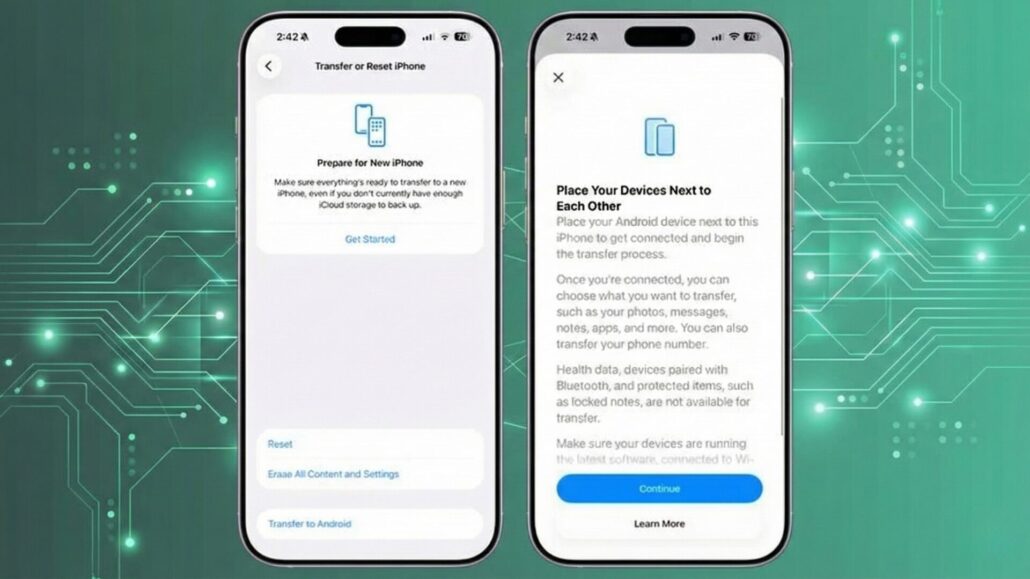
Apple is adding a built-in path for moving from iPhone to Android that doesn’t rely on downloading a separate transfer app—at least, that’s what’s showing up in the beta UI right now.
- What it is: A native “Transfer to Android” flow designed to move your stuff off an iPhone and onto an Android phone.
- Who it affects: iPhone users running iOS 26.3 beta who are switching to Android.
- Where it appears: Settings → General → Transfer or Reset iPhone → Transfer to Android
- What it moves (so far): Photos, messages, notes, apps, passwords, phone number, and more—but not everything. Health data, Bluetooth-paired devices, and protected items like locked notes are called out as not transferring.
- How it works (so far): It’s a “put the phones next to each other” style transfer with Wi‑Fi + Bluetooth involved, and it can kick off via QR code scan or a session ID + pairing code.
- Why it matters (plain English): Switching ecosystems is usually a week of annoying little losses (texts here, passwords there, “why is nothing signed in”). If Apple is shipping a first‑party “exit ramp,” that’s a meaningful shift—whether it’s motivated by regulation, competitive pressure, or both.
- Confidence level: Confirmed in UI. This is visible as a Settings path and described as a working transfer tool in early coverage.
Reality check: it’s still beta 1. Expect this flow to change, get renamed, or gain/lose categories before it ever hits a public release.
Notification Forwarding hints for third-party wearables
This is the spicy one, because it could be a big interoperability moment—if Apple actually follows through and if third-party partners can use it in a sane, privacy-respecting way.
In iOS 26.3 beta 1, a new “Notification Forwarding” interface shows up in Settings, and it’s explicitly framed around forwarding iPhone notifications to a third-party device.
- What it is: A new Settings UI for choosing a third-party device to receive iPhone notifications, plus per-app controls for what gets forwarded.
- Who it affects: People who use (or want to use) non-Apple wearables/accessories with an iPhone. Region behavior is still murky: the existence of the UI doesn’t automatically mean it’ll ship globally in the same form.
- Where it appears: Settings → Notifications → Notification Forwarding
- Key limitation (right now): One accessory at a time, and turning this on may disable Apple Watch notifications while it’s enabled.
- What gets forwarded: This appears to include the app name and the content contained in the notification, which means sensitive previews could be in play depending on your settings.
- Under-the-hood context: Early reporting suggests Apple is building the plumbing for third-party accessories via new framework work that hasn’t been fully documented yet.
- Why it matters (plain English): If Apple lets third-party wearables reliably mirror iPhone notifications, it removes one of the biggest practical reasons people feel locked into Apple Watch. But if the implementation is clunky (one device, Apple Watch gets cut off), it could also feel like compliance theater rather than a genuinely user-friendly feature.
- Confidence level: Confirmed in UI (the Settings entry exists) plus inferred intent (early framework/dev signals suggest Apple is building toward a broader system).
Also worth remembering: this “notification forwarding” idea has been bubbling in earlier betas, so 26.3 looks like Apple moving from “strings and hints” to “actual surface area.”
Smaller changes and under-the-hood updates
This is the part where beta 1 usually does its most important work… and also the part where it’s hardest to turn into sexy screenshots.
- Beta basics: iOS 26.3 developer beta 1 is live today (December 15, 2025).
- Expect groundwork: Early betas—especially x.3 builds in December—tend to skew toward bug fixing, stability, and performance rather than shipping big new UI features.
- Framework/API groundwork: The clearest “under the hood” tell so far is notification-forwarding-related framework work that suggests Apple is preparing third-party accessory support.
If I spot credible reports of specific fixes (battery, modem, crashing apps, UI glitches) that are corroborated beyond “a guy on Reddit,” I’ll add them. For now, the reputable coverage is still mostly about the two headline discoveries above.
What I have not confirmed yet
Here’s what people are already speculating about, but I’m not treating as real until there’s solid corroboration:
- Whether Notification Forwarding will ship as a broadly available consumer feature, or if it’s limited by region, device class, partner certification, or a later iOS 26.x release. The UI exists in beta 1; the shipping story is still unclear.
- Which third-party devices will support Notification Forwarding first (and whether “one accessory at a time” is a permanent limitation or just beta-era training wheels).
- Whether “Transfer to Android” expands what it can move (Health data is the obvious missing piece, but Apple may never want that to be seamless).
- Any surprise UI features beyond switching and forwarding. Beta 2 is where I’d expect more breadcrumbs if Apple is hiding anything fun.
What I’m watching for in beta 2: clearer region gating, expanded per-app forwarding controls, actual developer documentation for any new notifications framework, and any additional migration polish that shows up during device setup (not just buried in Settings).
Should you install iOS 26.3 beta 1
If you’re asking, the honest answer is: only in specific situations.
- Install it if you’re a developer who needs to test compatibility, or you’ve got a spare iPhone you don’t mind breaking for science.
- Back up first, because beta installs can go sideways and you’ll hate yourself if your only backup is vibes.
- Expect bugs and app weirdness, especially in beta 1. That includes random crashes, UI jank, and things that work one day and don’t the next.
- Battery hits are common early, and you shouldn’t treat day-one battery impressions as meaningful data unless you enjoy lying to yourself.
Wrap-up
So far, iOS 26.3 developer beta 1 is less “new toys” and more “Apple is quietly sanding down two big friction points”: switching away from iPhone, and iPhone notification access for third-party devices. Both have major implications if they actually ship as real features, and both could still change a lot before public release.
I’ll keep this roundup updated as more credible findings land.
Found something new in iOS 26.3 beta 1? Tell me what you’re seeing.


