

Prime Day 2026 starts June 23, but the early discounts are already live on Amazon as of June 20. I checked prices on every board in this roundup this morning. If you have been waiting to upgrade your keyboard, this is the window.
I have been getting asked for a mechanical keyboard roundup for months.
The category is scattered on TRT right now. The AULA WIN68 HE review covers gaming. The HyperX Alloy Origins 65 deal post covers the lead pick.
The best productivity desk setups for 2026 roundup mentions a couple of keyboards in passing.
There was no single place to send someone who wanted the shortlist. This is that place.
Seven picks. One Best Overall, three category winners, one comparison-only pick, and two specialty picks for the buyers who care about deep customization or competitive gaming. Every Amazon link in this article uses the same affiliate tag, so TRT earns a small commission if you buy. That does not change my picks.
The picks are based on verified specs and customer-review patterns across thousands of Amazon reviews.
| Product | Price | Key Spec | Best For |
|---|---|---|---|
| HyperX Alloy Origins 65 | $69.99 | Layout: 65%, Aluminum, PBT keycaps | Anyone who wants one solid mechanical |
| EPOMAKER x AULA F75 | $65.99 | Layout: 75%, Gasket, Tri-mode, Hot-swap | Writers, coders, anyone who types all day |
| Royal Kludge RK61 | $44.99 | Layout: 60%, Tri-mode, Hot-swap | Small desks, FPS players, impulse buyers |
| Logitech MX Mechanical Mini | $141.45 | Layout: 75% low-profile, Tactile quiet, Logi Bolt | Coworking, shared offices, Mac users |
| AULA WIN68 HE | $36.99 | Layout: 65%, Hall Effect, 8KHz polling | FPS gamers wanting Hall Effect |
| Logitech MX Keys S | $119.99 | Layout: Full-size, Scissor-switch, Logi Bolt | Premium non-mechanical alternative |
| Keychron V5 Max | $104.99 | Layout: 96% + numpad, QMK/VIA, 100hr battery | Coders who want QMK/VIA |
The Best Mechanical Keyboards for Prime Day 2026

Best Overall
HyperX Alloy Origins 65
$69.99 $99.99
The strongest opening CTA in the roundup. 15,127 Amazon reviews, 4.7 stars, Amazon’s Choice, 30% off, full aircraft-grade aluminum body, double-shot PBT keycaps, USB-C. The 65% layout is the consensus sweet spot for most desks. Switches are HyperX Red (linear) by default.
Best for: Best all-rounder
- Layout
- 65%
- Body
- Aircraft-grade aluminum
- Keycaps
- Double-shot PBT
- Switches
- HyperX Red (linear)
- Connection
- USB-C wired

Best for Writers & Programmers
EPOMAKER x AULA F75
$65.99 $79.99
Gasket mount, five-layer sound damping, 1.2mm single-key slotted PCB, double-shot PBT Cherry-profile keycaps, Bluetooth 5.1 plus 2.4GHz plus USB-C tri-mode, 4000mAh battery, hot-swap switches, rotary knob. The thocky typing feel most writers want at the lowest gasket-mount price in 2026.
Best for: Best typing feel + wireless
- Layout
- 75% + knob
- Mount
- Gasket, 5-layer foam
- Switch
- LEOBOG Reaper linear
- Connection
- BT 5.1 / 2.4GHz / USB-C
- Hot-swap
- Yes

Best Budget Under $50
Royal Kludge RK61
$44.99 $59.99
The cheapest entry point in the roundup. 60% layout, hot-swap, Bluetooth 5.0 plus 2.4GHz plus USB-C tri-mode, double-shot PBT keycaps, gasket mount, 1450mAh battery. RTINGS top cheap wireless mechanical pick. Trade-offs are plastic chassis and no dedicated arrow keys.
Best for: Best value impulse buy
- Layout
- 60%
- Body
- Plastic
- Keycaps
- Double-shot PBT
- Connection
- BT 5.0 / 2.4GHz / USB-C
- Hot-swap
- Yes

Best for Quiet Office
Logitech MX Mechanical Mini
$141.45 $159.99
The only low-profile quiet mechanical with the Logi Bolt ecosystem. Tactile quiet switches that will not annoy coworkers, recycled aluminum top case, smart illumination that reacts to your hands, 15-day battery. Pairs to the same Logi Bolt dongle as a Logitech mouse. Stock thin at this price.
Best for: Best for shared offices
- Layout
- 75% low-profile
- Switch
- Tactile quiet
- Body
- Recycled aluminum top
- Connection
- BT / Logi Bolt
- Battery
- 15 days

Best for Competitive Gaming (Hall Effect)
AULA WIN68 HE
$36.99 $49.99
Hall Effect magnetic switches with adjustable actuation, 8KHz polling, 0.3ms latency. The cheapest path into magnetic-switch gaming at $36.99 with 26% off. Wired only, plastic build, thin review volume. I cover the WIN68 HE in detail in the full review linked below.
Best for: Best for Valorant / CS2 players
- Layout
- 65%
- Switch
- Hall Effect magnetic
- Polling
- 8KHz, 0.3ms latency
- Actuation
- Adjustable
- Connection
- USB-C wired

Low-Profile Alternative (Non-Mechanical)
Logitech MX Keys S
$119.99 $129.99
Not mechanical. Low-profile membrane scissor-switch keyboard with smart illumination, the Logi Bolt ecosystem, and the #1 Best Seller rank in Computer Keyboards on Amazon. The clean alternative if mechanical is not your thing.
Best for: If you do not want mechanical
- Layout
- Full-size low-profile
- Switch
- Membrane scissor
- Body
- Plastic with metal plate
- Connection
- BT / Logi Bolt
- Battery
- Up to 5 months
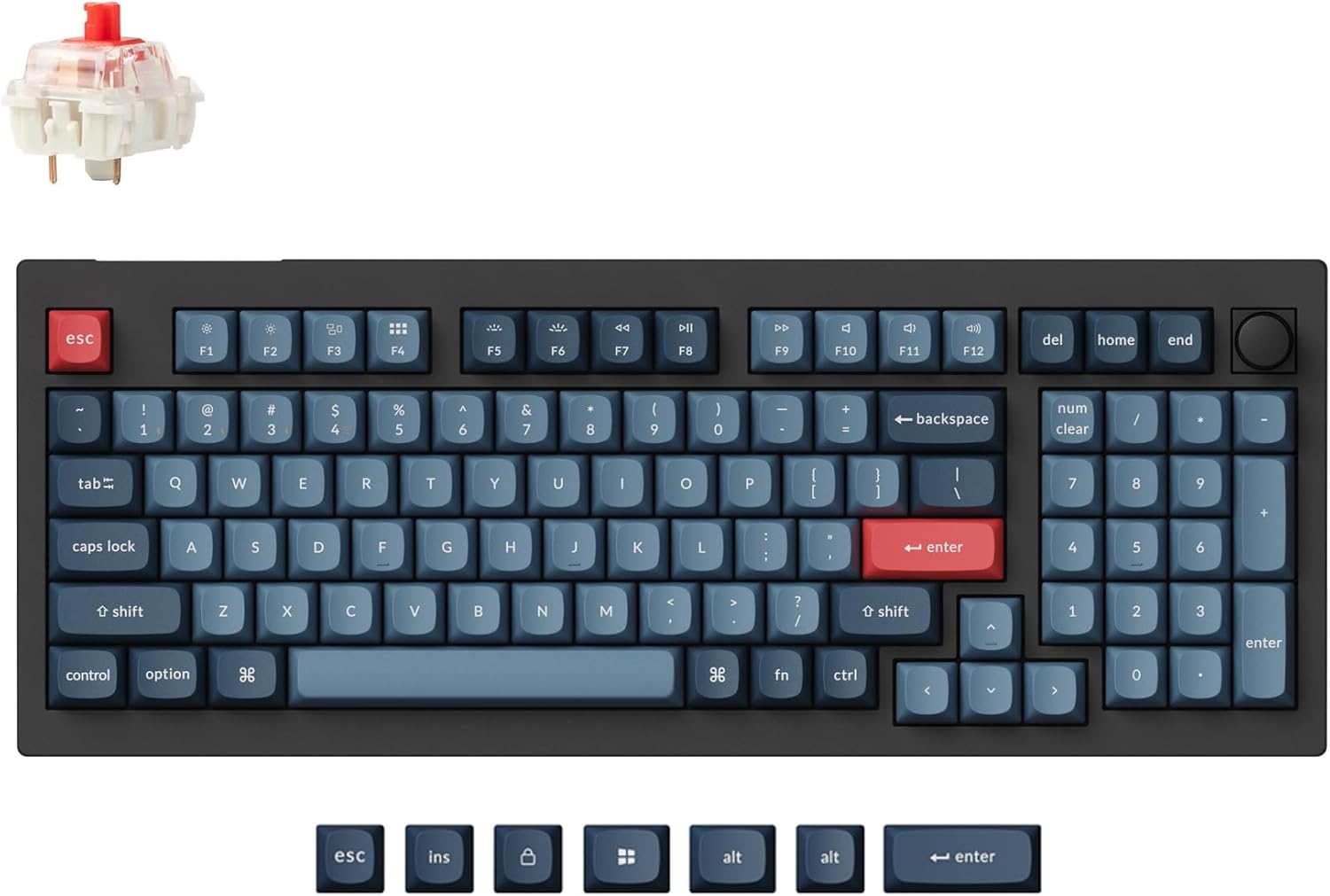
Best for Customization (QMK/VIA)
Keychron V5 Max
$104.99
QMK and VIA open-source firmware for per-key remapping, layers, and per-app profiles without vendor software. 96% layout with numpad, gasket mount, double-shot PBT keycaps, hot-swap, tri-mode, 4000mAh battery rated for 100 hours, 1000Hz polling. Wirecutter and RTINGS both recommend the V Max line. Review volume is thin (47).
Best for: Best for deep customization
- Layout
- 96% + numpad
- Firmware
- QMK / VIA
- Connection
- BT 5.1 / 2.4GHz / USB-C
- Battery
- 100 hours
- Hot-swap
- Yes
What mechanical keyboards actually are (and the buyer decision tree)
A mechanical keyboard uses individual mechanical switches under every key, instead of the rubber dome or scissor mechanism you get on a laptop keyboard or a cheap bundled keyboard.
That gives you better tactile feedback, more consistent typing feel, longer life, and the option to swap switches without buying a new board.
But the category is bigger than people realize, and the buying decision has three forks you need to navigate before you can pick a board.
The layout fork: 60%, 65%, 75%, TKL, or full-size
This is the fork most buyers skip, and it is the one that drives returns the most.
A 60% layout drops the function row at the top and the arrow cluster on the right. It is the smallest mechanical keyboard you can buy and it looks clean on a small desk. The catch: no dedicated arrow keys means you are using FN + key combos to scroll, move the cursor, or hit Delete.
The Royal Kludge RK61 at $44.99 is a 60% board and a great pick if you know what you are getting into. For most writers and remote workers, it is the wrong size.
A 65% layout adds the arrow cluster back. That is why 65% has become the consensus sweet spot, including for the HyperX Alloy Origins 65 and the AULA WIN68 HE. You keep the desk footprint compact and you keep the keys you actually press every day.
A 75% layout adds back a slim function row and usually a rotary knob for volume or scrolling. The EPOMAKER x AULA F75 is a 75%, and it is the layout most writers and programmers should pick. You get the function row shortcuts that 65% boards bury behind FN, and you do not pay the desk real estate cost of a full numpad.
TKL, or tenkeyless, is 87 keys with a full function row plus arrows but no numpad. Full-size adds the numpad. The Keychron V5 Max is a 96% layout, which is a niche between TKL and full-size that includes a numpad.
Pick based on your desk size and whether you use arrow keys more than a numpad. For most remote workers and writers, 65% or 75% is the right call.
The switch fork: linear, tactile, or clicky
This is the fork that determines how a mechanical keyboard feels.
Linear switches go straight down with no bump and no click. They are smooth, fast, and the quietest of the three. Most gamers prefer linear. HyperX Red and Gateron Yellow are common linear switches.
Tactile switches have a small bump partway through the press. You feel the moment the keystroke registers, which helps with typing accuracy and reduces bottoming-out. Most writers and programmers prefer tactile. Cherry MX Brown and Holy Panda are popular tactiles.
Clicky switches have the bump plus an audible click. They are the loudest. They type great in a quiet room and they annoy everyone around you. Most buyers in 2026 should skip clicky unless you live alone.
There is a fourth category worth knowing about: tactile quiet switches. These are the ones in the Logitech MX Mechanical Mini. They have the bump of a tactile switch but they are tuned to be quiet enough for an open-plan office. If you work around other people, this is the switch type to look for.
The third fork is build material and features, which I cover per-pick below.
The 7 picks, ranked
1. HyperX Alloy Origins 65: Best Overall ($69.99, 30% off)
If I had to buy one mechanical keyboard for someone who did not know what they wanted, this is the one I would pick.
The HyperX Alloy Origins 65 at $69.99 with 30% off is the strongest opening CTA in this roundup, and the reason is simple: 15,127 Amazon reviews, 4.7 stars, Amazon’s Choice badge, full aircraft-grade aluminum body, double-shot PBT keycaps that will not get shiny after a year, USB-C, per-key RGB, and 50+ bought in the past month.
The 65% layout is the right size for most desks. The switches are HyperX Red (linear) by default, with Aqua (tactile) and Blue (clicky) available. Linear is the right choice for the lead recommendation because it splits the difference between gamers and writers, even though pure tactile fans will prefer the Aqua.
The honest durability note: there are 188 customer mentions of reliability concerns across those 15,000+ reviews. That is below 1.3%, but the complaints cluster around year two of heavy daily use. Switch failures, USB connector issues, and the NGENUITY software being mediocre.
None of this changes the recommendation for most buyers, but if you plan to daily-drive this for five years, the soldered switches (no hot-swap) and the year-two reliability pattern are real factors.
The full deal post on this exact SKU from June 10 goes deeper on the specs. The 30% discount is verified live on Amazon as of June 20, 2026, and the PCMag review backs up the typing experience.
2. EPOMAKER x AULA F75: Best for Writers and Programmers ($65.99, 18% off)
This is the pick for buyers who care more about typing feel than brand recognition.
The EPOMAKER x AULA F75 at $65.99 has the spec sheet HyperX wishes it could match at this price: 75% layout with rotary knob, gasket-mount construction, five-layer sound damping (Poron foam plus IXPE plus PET plus silicone), 1.2mm single-key slotted PCB, double-shot PBT Cherry-profile keycaps,
Bluetooth 5.1 plus 2.4GHz plus USB-C tri-mode, 4000mAh battery, and hot-swap switches.
That is a real mechanical keyboard, not a starter board. The gasket mount is what gives it the soft, thocky typing feel that the writer and programmer crowd wants. Most gasket-mount boards in 2026 start at $90 to $120. EPOMAKER has it at $65.99 on Prime Day.
3,796 reviews, 4.6 stars, Amazon’s Choice. RTINGS lists it among the notable mentions in their budget roundup. The 18% discount is verified live.
The honest software note: EPOMAKER and AULA both have Windows-only configuration software that customers describe as sketchy (Google Drive downloads, poor translations, occasional driver weirdness). It works on Mac via the standard keymap layer, but you do not get the full visual customization.
If you live on Windows and do not mind a slightly janky software experience, this is a non-issue. If you need polished software for per-key RGB tuning, this is the wrong pick.
3. Royal Kludge RK61: Best Budget Under $50 ($44.99, 25% off)
The impulse-buy pick. The Royal Kludge RK61 at $44.99 with 25% off is the cheapest entry point in the roundup, and the spec sheet holds up: 60% layout, hot-swap, Bluetooth 5.0 plus 2.4GHz plus USB-C tri-mode, double-shot PBT keycaps, gasket mount, 1450mAh battery. 7,716 reviews, 4.5 stars, Amazon’s Choice.
RTINGS lists the RK61 as their top cheap wireless mechanical pick.
For $44.99, the trade-offs are real: plastic chassis (no aluminum like the HyperX), and the Bluetooth reliability is mixed (32 positive and 33 negative mentions in the review patterns). If you mostly use the 2.4GHz dongle, you avoid the Bluetooth complaints.
The 60% layout also means no dedicated arrow keys, which trips up first-time mechanical buyers.
If you have a small desk, want to try mechanical without committing $70+, or want a board you can throw in a bag without worrying about, this is the pick.
4. Logitech MX Mechanical Mini: Best for Quiet Office ($141.45, 12% off)
The MX Mechanical Mini is the most expensive pick in this roundup, and it earns the premium in one specific scenario: you work in a shared office or coworking space, and a clicky HyperX would get you uninvited feedback.
Logitech’s tactile quiet switches are genuinely quiet. Not silent, but quiet enough that the person sitting next to you will not hear you typing.
The low-profile mechanical form factor is closer to a laptop keyboard than to a chunky mechanical board, which makes the typing feel different from the EPOMAKER F75 or the HyperX.
It is faster, shallower, and easier on the wrists for long sessions.
The build is real: recycled aluminum top case, 47% post-consumer recycled plastic, smart illumination that reacts to your hands via proximity sensors, 15-day battery with backlight on, and full Logi Bolt receiver integration.
If you already use a Logitech mouse with a Bolt receiver, the keyboard pairs to the same dongle.
That is a real ecosystem win.
4.2 stars across 2,200 reviews is the lowest in this roundup, and it is worth knowing why. The smart illumination can be glitchy. macOS FileVault via Bluetooth requires the USB receiver for boot, so Mac users in security-sensitive environments need to plug in.
And at $141.45, the price-to-spec ratio is the weakest in the lineup.
You are paying for the typing feel, the quiet switches, and the ecosystem, not for raw hardware.
Stock warning as of June 20: Logitech shows only 19 left in stock at this price. Prime Day starts June 23, and if this sells out, the EPOMAKER F75 absorbs the quiet-office slot.
It is louder, but the gasket mount and PBT keycaps keep the typing sound acceptable. RTINGS covers the MX Mechanical in detail.
5. AULA WIN68 HE: Best for Competitive Gaming, Hall Effect ($36.99, 26% off)
The AULA WIN68 HE is the cheapest board in this roundup, and for the right buyer it is also the most specialized. Hall Effect magnetic switches, 8KHz polling, 0.3ms latency, adjustable actuation, USB-C wired only.
If you play Valorant, CS2, or any competitive FPS where rapid trigger and adjustable actuation matter, you already know what Hall Effect is.
This is the cheapest path into the technology at $36.99 with 26% off. RTINGS ranks it well for gaming latency, and the WIN68 HE is the #4 best-seller in PC Gaming Keyboards on Amazon.
The honest framing: this is a wired-only plastic-board gaming keyboard. The 65% layout works for FPS, the build is light, and the 509-review Amazon rating is thin compared to the other picks. It does not fit the remote-worker or writer audience at all.
I already covered the WIN68 HE in detail in the full WIN68 HE review from earlier this year. That post has the deep dive on the actuation tuning, the software, and the FPS-specific testing. This roundup just confirms it as the gaming pick.
6. Keychron V5 Max: Best for Customization, QMK/VIA ($104.99)
The Keychron V5 Max is the deep-customization pick. If you have ever wanted to remap every single key on your keyboard, set up Vim-style layers, or build per-app profiles without vendor software, QMK and VIA are the open-source firmware tools that make it possible.
Most boards in this price range lock you into the manufacturer’s software.
The V5 Max at $104.99 unlocks the firmware.
96% layout (97 keys plus numpad), gasket mount, double-shot PBT keycaps, hot-swap, Bluetooth 5.1 plus 2.4GHz plus USB-C tri-mode, 4000mAh battery rated for 100 hours, 1000Hz polling on 2.4GHz.
The spec sheet is strong across the board, and both Wirecutter and RTINGS recommend the Keychron V Max line.
The honest concern: 47 reviews. That is dangerously thin for a roundup CTA, and it will scare off buyers who scroll past low review counts. The 4.7-star average is excellent on those 47, and the external validation from Wirecutter and RTINGS carries the recommendation.
But you should know the social proof is thinner than the HyperX or the EPOMAKER before you commit. Keychron as a brand has been around long enough that the risk is low, but the Amazon-specific review volume is what it is.
If mechanical is not for you
I get it. Not everyone wants the typing feel, the height, the sound, or the learning curve of a mechanical keyboard.
If you want a low-profile premium keyboard that types well and is dead silent, the Logitech MX Keys S at $119.99 with 8% off is the right call.
It is not mechanical. It is a low-profile membrane scissor-switch keyboard with smart illumination, the Logi Bolt ecosystem, and a 4.4-star rating across 3,587 reviews.
It is the #1 best-seller in Computer Keyboards on Amazon for a reason. PCMag covers it well as the upgrade-from-the-laptop pick for office workers.
If mechanical is your thing, scroll back up. If it is not, the MX Keys S is the alternative I would recommend.
Prime Day 2026 timing
Prime Day 2026 runs June 23 to 26. As of June 20, the early Prime Day pricing is live on every board in this roundup except the Keychron V5 Max (Keychron typically runs its Prime Day discount deeper on June 23, so the V5 Max may drop to around $90 by mid-week).
If you are sitting on a decision, the safest move is to wait until June 22 to confirm prices. Amazon discounts sometimes shift at the official start. The HyperX, EPOMAKER, Royal Kludge, and AULA prices are already at Prime Day levels. The Logitech and Keychron prices may get better on June 23.
If the Logitech MX Mechanical Mini sells out (only 19 in stock as of June 20), the EPOMAKER F75 absorbs the quiet-office slot. Same recommendation, slightly louder typing sound.
FAQ
What is the best mechanical keyboard for under $100?
For most people, the HyperX Alloy Origins 65 at $69.99 is the strongest sub-$100 pick. It has aluminum body, PBT keycaps, 4.7 stars across more than 15,000 Amazon reviews, and Amazon’s Choice badge.
If you want better typing feel and wireless tri-mode at the same price, the EPOMAKER x AULA F75 at $65.99 is the better fit for writers and programmers.
Are mechanical keyboards louder than regular keyboards?
Most are louder, but not all. Clicky switches are the loudest and not great for shared offices. Linear switches are quieter but still clicky on keypress.
Tactile quiet switches, like the ones in the Logitech MX Mechanical Mini, are about as quiet as a low-profile laptop keyboard while still giving you the mechanical feel.
If noise is the priority, look for the words tactile quiet in the switch description.
Which mechanical keyboard is best for office use?
The Logitech MX Mechanical Mini at $141.45 is the only low-profile quiet mechanical with the Logi Bolt receiver ecosystem.
It has recycled aluminum in the top case, smart illumination that reacts to your hands, and a 15-day battery claim. It is expensive, but if you work in a shared office or coworking space, it is the cleanest mechanical option that will not annoy the person sitting next to you.
What’s the difference between 60%, 65%, 75%, and TKL layouts?
60% drops the function row and arrow keys. 65% keeps the arrows but cuts most of the function row. 75% adds back a slim function row and usually a rotary knob. TKL, or tenkeyless, is 87 keys and keeps the full function row plus arrows but drops the numpad. Full-size adds the numpad.
For most writers and remote workers, 65% or 75% hits the sweet spot of compact size without losing daily-use keys.
What is Hall Effect and do I need it?
Hall Effect, also called magnetic, switches use magnets instead of metal contacts, which lets the keyboard detect keypress by how far down you press.
The AULA WIN68 HE at $36.99 uses Hall Effect for adjustable actuation, 8KHz polling, and rapid-trigger features that competitive Valorant and CS2 players care about.
If you do not play those games, you do not need Hall Effect.
A regular hot-swap mechanical will type just as well.
Are hot-swappable switches worth it?
Yes for most people in the $50 to $150 range. Hot-swap lets you pull out a switch and replace it without soldering. That means if a switch dies, you fix it in 30 seconds. It also lets you try different switch types, linear, tactile, clicky, before committing.
The $10 premium for hot-swap is almost always worth it over the life of the board.
What’s the best mechanical keyboard for Prime Day 2026?
Prime Day 2026 runs June 23 to 26. As of June 20, the early Prime Day pricing is already live on the seven picks in this roundup.
The HyperX Alloy Origins 65 at $69.99 (30% off) is the lead deal.
The EPOMAKER x AULA F75 at $65.99 (18% off) and the Royal Kludge RK61 at $44.99 (25% off) are the next two strongest.
Prices can shift when Prime Day officially starts, so re-verify on June 22 if you are sitting on a decision.
Is the Logitech MX Mechanical Mini worth $140?
It depends on what you need. If you work in a shared office, want low-profile mechanical feel, and already use Logi Bolt accessories like a Logitech mouse, yes. The quiet tactile switches are genuinely office-friendly, and the Logi Options+ integration is the best on the market.
If you only type at home and care about value, the HyperX at $69.99 gets you 90% of the typing experience for half the price.
What is QMK/VIA and do I need it?
QMK and VIA are open-source firmware tools that let you remap every single key on your keyboard, set up layers, and create per-app profiles without installing any vendor software.
The Keychron V5 Max supports both at $104.99.
You need it if you want deep customization, for example Vim-style layers for coding, or per-app shortcuts. If you just want a keyboard that types well, you do not need it.
How long do mechanical keyboards last?
Most quality mechanical keyboards last 5 to 10 years with daily use. The switches are rated for 50 to 100 million keystrokes, depending on the brand.
Plastic cases wear faster than aluminum ones, and soldered switches cannot be replaced if they fail.
Hot-swap boards like the EPOMAKER F75 and the RK61 last longer in practice.
The HyperX Alloy Origins 65 is soldered, and there are 188 customer mentions of reliability issues, mostly after year two of heavy use, so factor that in if you plan to daily-drive it.


Сайты для ставок являются сертифицированные платформы, которые предлагают спортивные прогнозы на самые разные состязания.
Важнейшая цель букмекера — сформировать котировки на каждое исходы игры, показывающие шансы определённого варианта.
При выборе оператора рекомендуется смотреть на наличие лицензии, имидж и функциональность интерфейса.
Надёжный контора предоставляет прозрачные выплаты, широкую линию и мгновенную обратную связь клиентов.
https://knowyourmeme.com/users/zionmontoya82