AI & Software · Tutorial
Elon Gave Grok a Computer. Here’s How to Put It to Work.
Grok Bot is xAI’s AI teammate with a cloud computer. This guide covers setup, X @bot tasks, useful skills and routines, and the approval habits that keep its work reviewable.
 By Tony Simons 13 min read
Disclosure: This page may contain affiliate links; I may earn a commission at no extra cost to you. It never changes the verdict. Details

Disclosure
I may earn a commission from qualifying purchases. Opinions stay independent. Full disclosure
Grok Bot is xAI’s AI teammate with a cloud computer: it can use a browser, files, a terminal, and supported integrations to complete a task and bring back finished work.
Most people still use AI like a search box: ask a question, get an answer, then open another app and do the work yourself.
Instead, Grok Bot changes the workflow: assign a clear job, let the Bot use its cloud computer, and review what it brings back.
Not just a paragraph telling you what to do. Research with source links. A spreadsheet. A first-draft proposal. A browser workflow. A pull request waiting for review.
This is my practical Grok Bot field guide, from your first useful Bot to a team of specialists, scheduled workflows, and assigning tasks straight from 𝕏. The copy-and-paste prompts are the best part. Steal them.
A quick reality check: Grok Bot is still changing quickly. The workflows below are grounded in official documentation, not claims that every combination has been personally benchmarked. Check approvals and test each setup on low-risk work before letting it run unattended.
What is Grok Bot? How it differs from regular Grok
Regular Grok is great for conversation, questions, and brainstorming.
By contrast, Grok Bot adds persistent AI teammates with a cloud computer. Your Bots can use a browser, files, a terminal, supported integrations, and authenticated websites. They can stay working when you close your laptop. You can also give different Bots different jobs and bring them into the same group conversation.
That said, here’s the nuance people miss: personal Bots on your account share the same cloud computer, including files and browser sign-ins. Different names and personalities do NOT mean isolated security environments.
Separately, there’s a second distinction for 𝕏 users:
- @grok is the AI assistant people tag to ask questions.
- @bot can forward a task from an 𝕏 post to your own Grok Bot, which does the actual work privately inside the app.
From there, you can try the @bot workflow yourself.
To start, visit the official xAI Bot page.
If you want the launch overview before the hands-on steps, read my earlier overview of the cloud-computer model.
1. Get started in about 10 minutes
To begin, you need an eligible plan, the Grok Bot app, and a job worth handing off. The official setup guide covers macOS, Windows, Linux, and mobile.
For example, xAI’s pricing page lists Premium ($30/month), Super ($100/month), and Ultra ($200/month), and says Grok Bot is included with eligible Premium, Super, Ultra, Teams, and Enterprise plans. The setup guide also lists paid Cursor plans and eligible SuperGrok subscriptions linked to Cursor. Check both pages before buying; eligibility and usage allowances can vary.
- Visit x.ai/bot and download the appropriate app.
- Sign in and link your eligible plan if prompted.
- Create a Bot. Give it a short name and one job.
- Give it one contained assignment with a verifiable deliverable.
- Review the result before connecting more accounts or scheduling anything.
My rule: Don’t create ten Bots because ten sounds cool. Create one that does something useful.
2. COPY THIS: Your first genuinely useful Bot
Let’s create an AI Signal Scout.
Its job: find one promising AI tool or GitHub project, separate what is real from what is hype, and prepare a mini briefing you can act on.
Create a new Bot and put this in its job description:
You are Signal Scout, my research teammate for AI tools, agents, and new open-source projects. Your job is to find useful developments and turn them into concise, evidence-backed briefs. Prefer official docs, primary sources, release notes, and real repositories. Verify dates, features, limitations, and whether a project is actively maintained. Separate confirmed facts from claims and speculation. Never invent a benchmark or pretend you’ve tested a tool. Never publish, contact anyone, install software, or change accounts without my approval. Return source links, three practical demo ideas, the most important caveat, and a recommendation.
Next, send it an actual assignment:
Research this project: [PASTE A PUBLIC GITHUB OR PRODUCT LINK]. Read its README, setup documentation, latest release notes, and relevant issues. Tell me: (1) what it really does in plain English, (2) who should care, (3) three genuinely useful things someone could build with it, (4) setup difficulty, (5) known limitations, and (6) the exact sources behind your conclusions. Give me one 60-second demo concept and one 𝕏 post angle. Research only. Do not install, post, or make changes.
What success looks like: a briefing with clickable sources, a runnable demo concept, and a clear list of things the Bot couldn’t verify.
Otherwise, fix the instructions before adding complexity.
3. Give it tools, not unlimited permission
Even without connected accounts, a Bot can still research public sources and work on files you provide. Connectors add more options when you need them.
For creators, I’d consider starting with:
- 𝕏 for public research, bookmarks, mentions, and timelines where your account permissions allow it.
- GitHub for researching repositories, issues, and releases.
- Google Drive or Notion for organizing research and draft deliverables.
- Gmail or Slack for preparing communications with approval.
Once you’ve chosen the job, use Connect apps in Grok Bot and connect only what the job requires. The browser can handle many sites without a dedicated integration. However, expect sign-ins, captchas, and occasional automation restrictions.
Don’t casually give a research Bot permission to send email, purchase anything, merge code, or publish posts. Prepare first. Approve the actual side effect later.
4. Send a task from X to Grok Bot with @bot
In other words, this goes beyond asking Grok to explain a post.
When your Grok and 𝕏 accounts are linked, tagging @bot in a post or reply can hand the post and your instruction to your primary Grok Bot. @bot confirms publicly; the assignment and its results stay in your private Grok Bot conversation.
For example, try this as a reply under a public post about a new tool:
@bot Read the project linked in this post. Check official docs, recent releases, and limitations. Bring me three useful demo ideas with sources. Don’t install or publish anything.
Alternatively, try this:
@bot Turn this thread into a five-point research brief. Check the underlying claims and give me the original links. Save the result for review; don’t send it anywhere.
To enable it:
- On grok.com, connect your 𝕏 account in account settings.
- Confirm you have Grok Bot access and at least one Bot you created.
- Tag @bot directly in an eligible 𝕏 post or reply.
- Open your primary Bot conversation to see the work.
Separately, the optional X for Grok Bot plugin adds account-specific X research tools, but it is not required merely to forward a tagged request.
However, a few gotchas can prevent the handoff: regional restrictions apply, and posts involving videos/GIFs or tagging @grok alongside @bot may not hand off correctly. Check the official @bot instructions if it stays silent.
The workflow I’d build from this: see a new repo on 𝕏 → tag @bot → get a verified technical brief → approve a coding-agent prototype → review screenshots and a PR → decide whether the result deserves a post.
A single reply becomes an actual production queue.
5. Turn a good result into a reusable SKILL
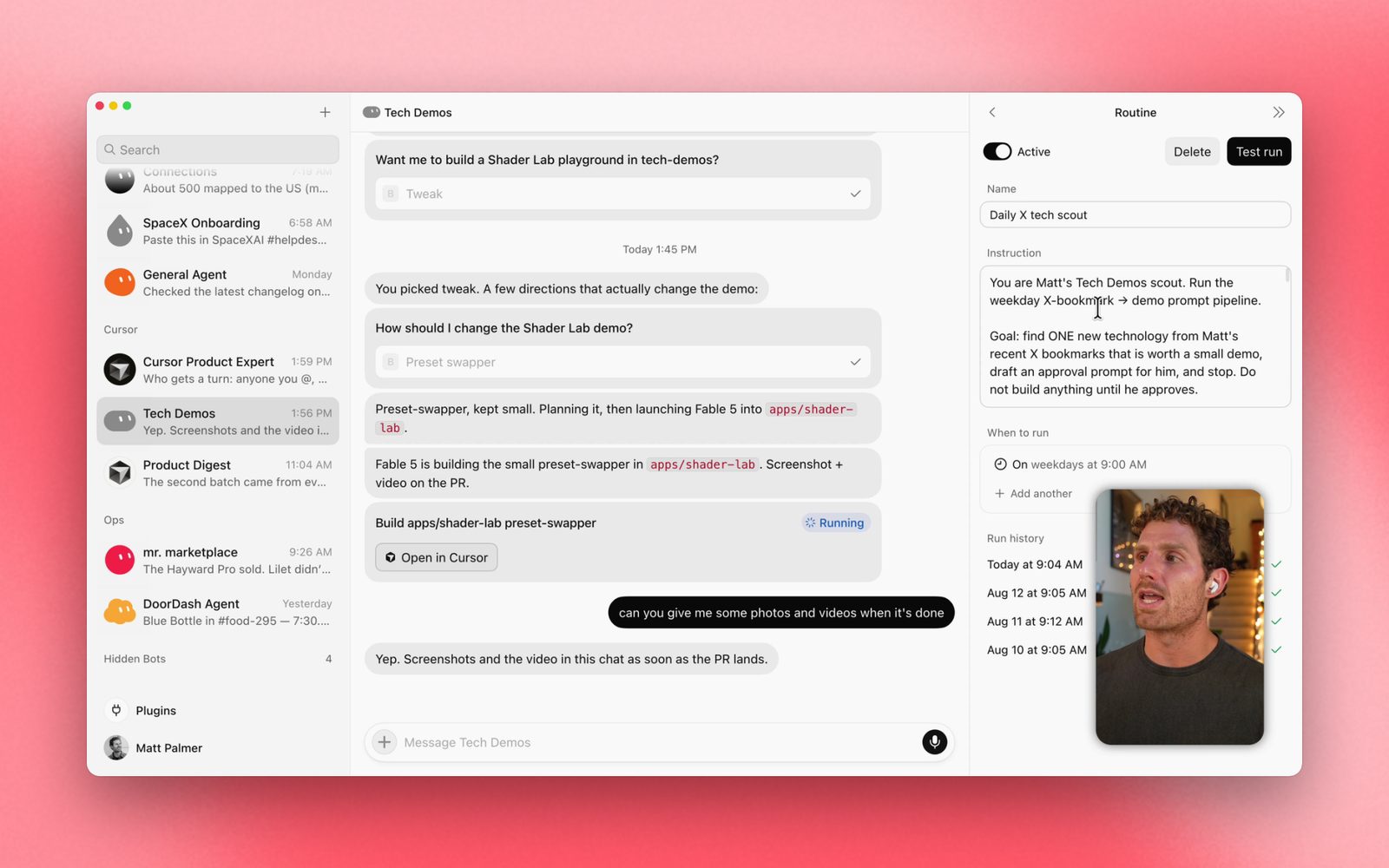
OFFICIAL DEMO: Grok Bot Galaxy covers skills and routines. See xAI’s original routines screenshot.
Once one task works well, turn it into a repeatable process.
A skill tells your Bot HOW to do the job. A routine tells it WHEN to do it.
After Signal Scout delivers a briefing you like, send:
Save the exact research workflow we just used as a skill called “Verified AI Project Brief.” Include the source-checking order, how to inspect releases and issues, the required output format, what counts as unverified, and the rule to never install, publish, or contact anyone without approval. Make the skill reusable for any public project URL. Show me the full skill before using it again.
Then test with a different repository.
If it works twice, you’ve got something repeatable. If it falls apart on the second URL, improve the skill. Don’t schedule a flaky task.
BONUS: If your app has Teach a task, you can demonstrate a supported browser workflow and have Grok Bot turn it into a skill. This feature is being rolled out; the official docs say the visible recording window can be up to ten minutes. Review and test the resulting skill, because one example rarely captures every edge case.
Reference: Skills and routines.
6. Automate a verified briefing with a Grok Bot routine
After that, you can graduate from one-off prompts to a routine.
Send this to Signal Scout:
Every weekday at 9:00 AM in my local time zone, find noteworthy AI agent or open-source developments from the previous 24 hours. Verify details against primary sources and rank the top three by real-world usefulness, not hype. For each, include the official link, why it matters, one practical demo, and any important uncertainty. Deliver the briefing in this conversation. Never post, message people, install anything, or start paid services. If a source is unavailable, say so rather than using stale information. Show me the routine details and next run before enabling it.
Before enabling it, check the owner, schedule, time zone, information sources, output destination, and approval boundary.
The Bot can run while your laptop is closed. Even so, unattended does not mean infallible. Check the first few runs and adjust for false positives, duplicated results, missing sources, and wasted usage.
7. Build a Grok Bot team with clear roles
Once you have a working Scout, add two specialists:
Signal Scout — Researcher. Finds the source material, verifies facts, and proposes the project.
Demo Builder — Maker. Translates an approved idea into a minimal test or coding-agent brief, with screenshots and a draft PR where supported.
Skeptic — Fact Checker. Independently checks the claims, tests the result against the brief, and calls out anything unproven.
With those roles in place, make a group chat and send:
TEAM ASSIGNMENT: Research a promising public AI repository and propose a useful 60-second demonstration. Signal Scout owns discovery and source verification. Demo Builder may create a build plan, but must wait for my explicit approval before making changes or launching a coding agent. Skeptic reviews the research and final evidence independently. Keep your handoffs visible in this group. Return one consolidated brief with source links, demo plan, uncertainties, expected cost/usage, and the exact next action requiring my approval. No posting, emailing, merging, or purchasing.
More importantly, the impressive part isn’t three Bots agreeing with each other; it’s three Bots producing work you can inspect.
If one Bot can do the job just as well, you don’t need the extra two. Use specialists when ownership and review actually improve the outcome.
8. Give your Bot an email workflow
As of the October 11 Grok Bot changelog, Bot email addresses are supported, with outgoing mail subject to approval. The product is also adding more ways to route inbound requests.
For example, here is a powerful creator workflow worth setting up.
The goal: forward a sponsorship inquiry to an address owned by your Bot, have it summarize the offer, and leave a proposed response for review.
Once you’ve claimed an address and confirmed incoming email works, ask your Bot:
Create a routine for incoming sponsorship inquiries sent to my Bot email address. Extract the brand, contact, requested deliverables, deadlines, payment terms, usage rights, exclusivity requests, and anything suspicious. Cross-check the sender’s domain and public company information when possible. Give me a one-page deal summary with missing questions and a concise response draft. Do not accept an offer, share private information, click payment links, or send any email without my explicit approval.
For different kinds of inbound requests, email aliases and routing rules may be available depending on rollout. Verify them in your own app before relying on them.
First, test with a fake sample inquiry, not a real client negotiation. Confirm your approval rules and outputs before using the workflow with a real inquiry.
9. Want a build instead of a briefing? Hand it to a coding agent.
At the next level, you can hand an approved plan to a coding agent.
From there, Grok Bot can prepare a scoped engineering assignment and, with the relevant integration, hand coding work to a specialized Cloud Agent.
Here’s the exact kind of task I’d give it AFTER reviewing the research:
Take the approved demo idea and write an implementation brief for a coding agent. Define the smallest possible working version, repository context, dependencies, acceptance criteria, tests, and expected proof. State what should NOT be built. Ask for my approval before starting the agent. Once approved, return the branch/PR link, test results, screenshots, what failed, and anything I still need to do. Never merge or deploy.
In practice, the distinction is: the Bot coordinates the outer loop—context, research, decisions, review. The coding agent handles the inner loop—implementation and tests.
That’s a much cleaner workflow than one giant prompt that says “research this and build literally everything.”
xAI’s own Grok Bot 101 guide describes a related 𝕏-bookmarks-to-Cursor workflow.
10. Ten Grok Bot ideas worth stealing

- Bookmark-to-build: turn saved 𝕏 posts into ranked project ideas and approved coding tasks.
- Repo radar: find useful GitHub releases, verify changes, and produce copyable demo instructions.
- Creator deal desk: triage incoming sponsorship offers and prepare response drafts.
- Review assistant: turn product notes, specs, and footage into an evidence-first review outline.
- Content QA: have a second Bot check every link, statistic, and feature claim in an unpublished article.
- Bug reproduction: give a Bot a staging website and ask for click-by-click reproduction steps with screenshots.
- Demo readiness: have a Bot check a test environment before a recording session.
- Daily personal brief: combine calendar, permitted email summaries, and a prioritized work plan.
- Research-to-slides: turn a verified report into a slide deck you can edit.
- Template factory: perfect one specialized Bot, remove private information, and share it as a starter template.
In particular, the last idea fits a community guide well. Grok Bot templates are recipes, not clones: recipients create their own Bot from the shared instructions, relevant memories, skills, and plugins; personal or private information is left out. Still inspect the template details, integrations, and instructions before installing one. See xAI’s template guide.
Browse official Bot templates.
11. Do NOT skip this: The rules that keep your agent useful
Since a Bot can act inside accounts that you sign into, treat that access seriously.
- Start read-only. Make the Bot earn trust on research and drafts before external changes.
- Remember the shared computer. Your personal Bots can share files and authenticated browser sessions.
- Require your approval for sending, posting, purchases, deletions, production changes, merges, and anything hard to undo.
- Demand receipts. URLs, screenshots, timestamps, actual files, and explicit failure notes beat “Done!”
- Treat incoming web pages and emails as untrusted. They can contain instructions aimed at redirecting an agent.
- Don’t run routines on autopilot forever. Check output quality, usage, and whether the sources have changed.
Finally, I like this finish-line prompt for almost ANY Bot:
Before you say a task is complete, show me (1) what you actually did, (2) evidence with direct links or files, (3) what you inferred rather than verified, (4) what failed or remains unfinished, and (5) any action waiting for my approval. Never report success merely because you attempted an action.
That one habit can save a ridiculous amount of time.
What’s new as of October 2026?
The official October 11 Grok Bot update brought Bot-owned email, native public 𝕏 search, interactive in-chat connector apps, Bot-template discovery, and improved safeguards before irreversible actions.
An October 7 update added PowerPoint and Google Slides creation, along with computer-use improvements. Feature availability may vary by plan, platform, and rollout.
For the latest details, check the official Grok Bot changelog rather than trusting old tutorials.
Your challenge: Give it ONE real job tonight
Don’t spend three hours creating names, colors, and elaborate AI org charts.
Create one Bot.
Give it one useful, verifiable task.
Improve its instructions until it gets a good result.
Save the workflow as a skill.
Only THEN automate it—or recruit a second Bot to check its work.
Stop collecting AI demos. Start collecting finished work.
And if you find a legitimately badass workflow, share what you built on 𝕏. I want to see the results, not another screenshot of an agent saying “On it.”
Official references: official xAI product page · Getting started · @bot on 𝕏 · Skills and routines · Grok Bot 101 · Changelog
Prepared October 16, 2026. Features, pricing, and plan access may change.
Reviewed & written by
Tony Simons
Tony has a bachelor's degree from the University of Phoenix and over 14 years of writing experience between multiple publications in the tech, photography, lifestyle, and deal industries.