AI & Software · Tutorial
How to Test a Regex in regex101 Without Missing Bad Matches
Test a JavaScript regex against good and bad examples, catch partial matches, and understand the flags before using it.
 By Tony Simons 3 min read
Disclosure: We may earn a commission when you shop through the links below. It never changes the verdict. Details
Disclosure
We may earn a commission when you shop through the links below. Opinions stay independent. Full disclosure
A regex can find exactly what you asked for—and still find something you did not mean to include. That is why a couple of deliberately awkward test cases are more useful than celebrating the first green match.
Quick answer: In regex101, choose the same regex flavor as your application, enter a pattern and synthetic test strings, then inspect both matches and nonmatches. For a list where each line must be an entire code, test line anchors as well as a shorter word-boundary pattern.
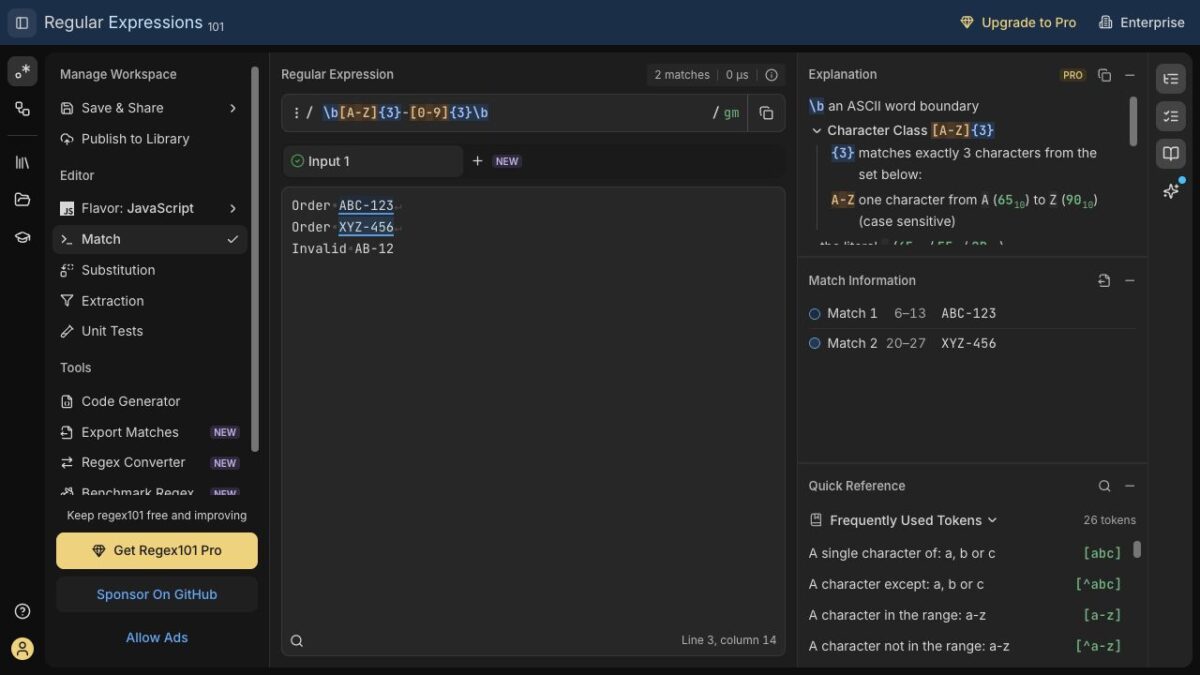
For this guide, we tested the examples below in regex101’s JavaScript flavor using fictional data. The editor highlighted two valid-looking codes, exposed a partial match in a longer code, and then rejected that longer line after we changed the pattern. We did not test the pattern in a production application or other regex engines. Interface options can change.
Featured image: the regex101 editor, captured firsthand during our test.
Start with examples that should pass and fail
Suppose each code should contain three uppercase English letters, a hyphen and three digits. Open regex101, select JavaScript from Flavor, and use Match mode. In the Regular Expression field, enter the pattern without the surrounding slash delimiters:
b[A-Z]{3}-[0-9]{3}bIn Test String, enter these fictional examples on separate lines:
ABC-123
XYZ-456
AB-12
ABC-123-456
Make sure the g flag is on so the editor finds successive matches. In our test, ABC-123 and XYZ-456 matched; the short AB-12 did not. But the first part of ABC-123-456 also matched. That third match is the useful warning: a match count alone does not tell you whether the whole input is valid.
Why the longer code matched
[A-Z]{3} asks for three uppercase letters, the hyphen is literal, and [0-9]{3} asks for three digits. The b assertions check word boundaries; they do not mean “the entire line ends here.” A hyphen is not a word character, so a boundary can exist between the final digit of ABC-123 and the next hyphen. Mozilla’s word-boundary reference explains the distinction.
For finding codes inside sentences, that behavior might be fine. For validating one complete code per line, it may be exactly the bug you want to catch.
Test whole lines instead
Replace the pattern with:
^[A-Z]{3}-[0-9]{3}$Keep g and m enabled for this multi-line example. In JavaScript, m lets ^ and $ match line boundaries; g finds successive matches. In our test the first two lines matched and both invalid lines stayed unmatched. See MDN’s input-boundary reference and regex101’s flag guide.
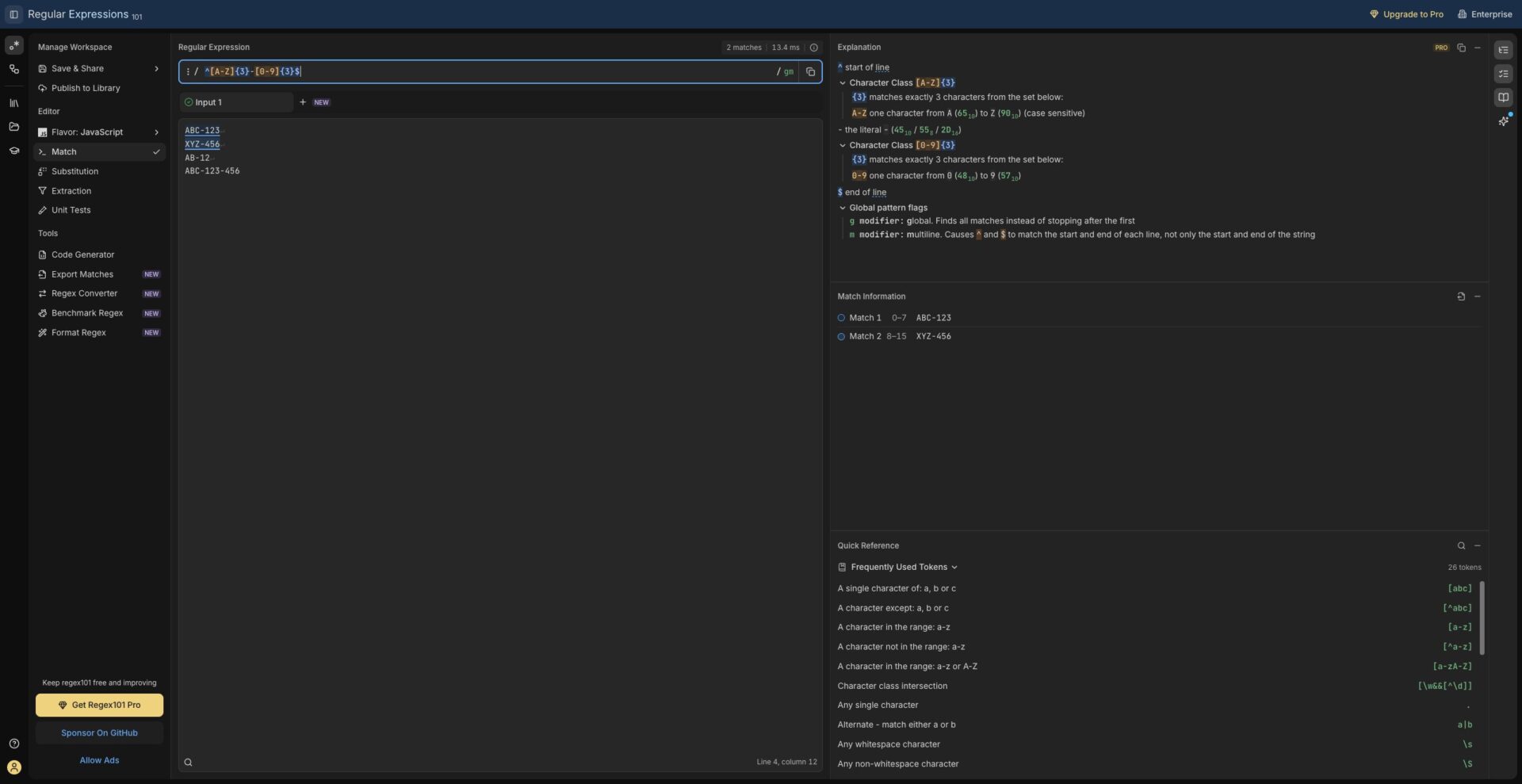
Those flags suit this test list. If your app validates one input string at a time, decide whether you actually want multiline behavior; an embedded newline changes what ^ and $ mean with m. Also decide whether leading or trailing spaces should be accepted. This sample deliberately does not accept them on an otherwise valid line.
Before you copy the pattern into an app
- Check flavor and flags. JavaScript, Python and other regex engines can differ. Copy the intended pattern and flags into the target environment and test there; a browser demo is not an integration test.
- Add near misses. Try lowercase letters, missing digits, extra suffixes and surrounding whitespace. Decide which should pass before changing the expression. With no
iflag, this example is case-sensitive. - Keep examples safe. regex101 says matching runs locally, but saving or publishing a workspace sends its contents to the service and a draft link can expose its fields. Use fictional examples for anything you share; see its privacy documentation.
- Review what the expression proves. Matching a format does not prove an order exists or that a code is authorized. Validate those facts separately.
Write down the expected result for a few good inputs and a few ugly ones. Then make the pattern earn your trust by passing both.
The Inner Circle
One AI shortcut a week. Tested first.
The tools and tricks I actually kept using, sent once a week. Skip the hype threads.
- New verdicts and scores
- Same-day workflow tips
- No spam, unsubscribe anytime
Written by
Tony Simons
Tony has a bachelor's degree from the University of Phoenix and over 14 years of writing experience between multiple publications in the tech, photography, lifestyle, and deal industries.